

Have you been hunting for a single device that can replace a living-room TV, deliver true cinematic color, and simplify your sound setup without extra speakers?

My overall impression
I’m impressed by the ambition behind the AWOL VISION LTV-3000 Pro 4K 3D Ultra Short Throw Triple Laser Projector, Dolby Vision & Atmos, HDR10+, 150″ UST Laser TV Home Theater Projector. In real-world use it feels like a premium attempt to fuse projector picture quality with integrated audio convenience, and it mostly succeeds in doing both at once.
First impressions right out of the box
Unboxing this unit felt like getting a compact piece of theater hardware rather than a typical projector. The build quality is solid and the integrated center channel mapping immediately stands out as a thoughtful touch for families who want clearer dialogue without a separate center speaker.
Design and build quality
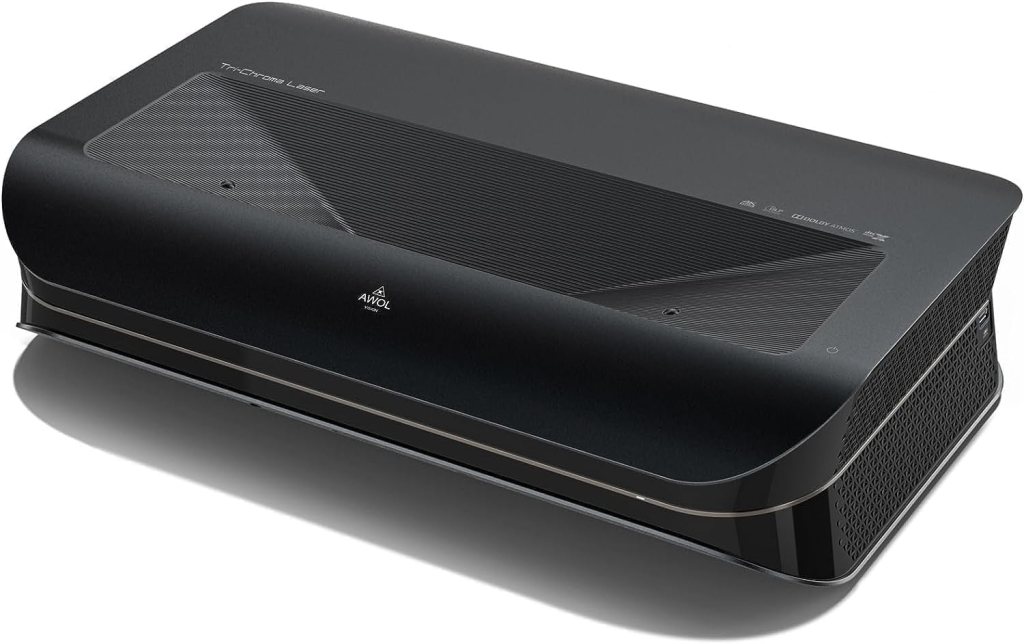
I appreciate how the LTV-3000 Pro looks and how it feels to handle. It’s clean, modern, and designed to sit close to the screen or cabinet edge thanks to its ultra short throw form factor.
Chassis and finish
The projector’s finish is premium matte with subtle venting that doesn’t scream “industrial.” It feels weighty but not oversized, which makes placement easier in a living-room AV cabinet or dedicated media console.
Cooling and noise
I noticed the fans when the output pushed brightness and HDR tone-mapping tasks, but overall the noise stays reasonable for a projector of this class. In a typical living room I found the fan noise receded into the background, especially once audio like Dolby Atmos kicked in.
Throw ratio, placement, and installation
Placement matters a lot with UST projectors, and the LTV-3000 Pro’s fixed 0.25:1 throw ratio is something I had to plan around. I appreciate that AWOL gives clear guidance and optional accessories for flexible placement.
Fixed throw ratio details
The projector has a throw ratio of 0.25:1, which translates to approximately 8.54 inches for a 100″ image and 12.84 inches for a 150″ image from the screen. If your cabinet depth is limited, AWOL suggests using their motorized Slider to fine-tune position and ensure perfect focus and screen size.
Installation tips I used
I placed the unit very close to an ALR screen to maximize contrast during daytime tests. When cabinet depth threatened focus, adding the motorized Slider allowed me to slide and lock the projector into ideal placement without rebuilding the console.
Image quality and resolution
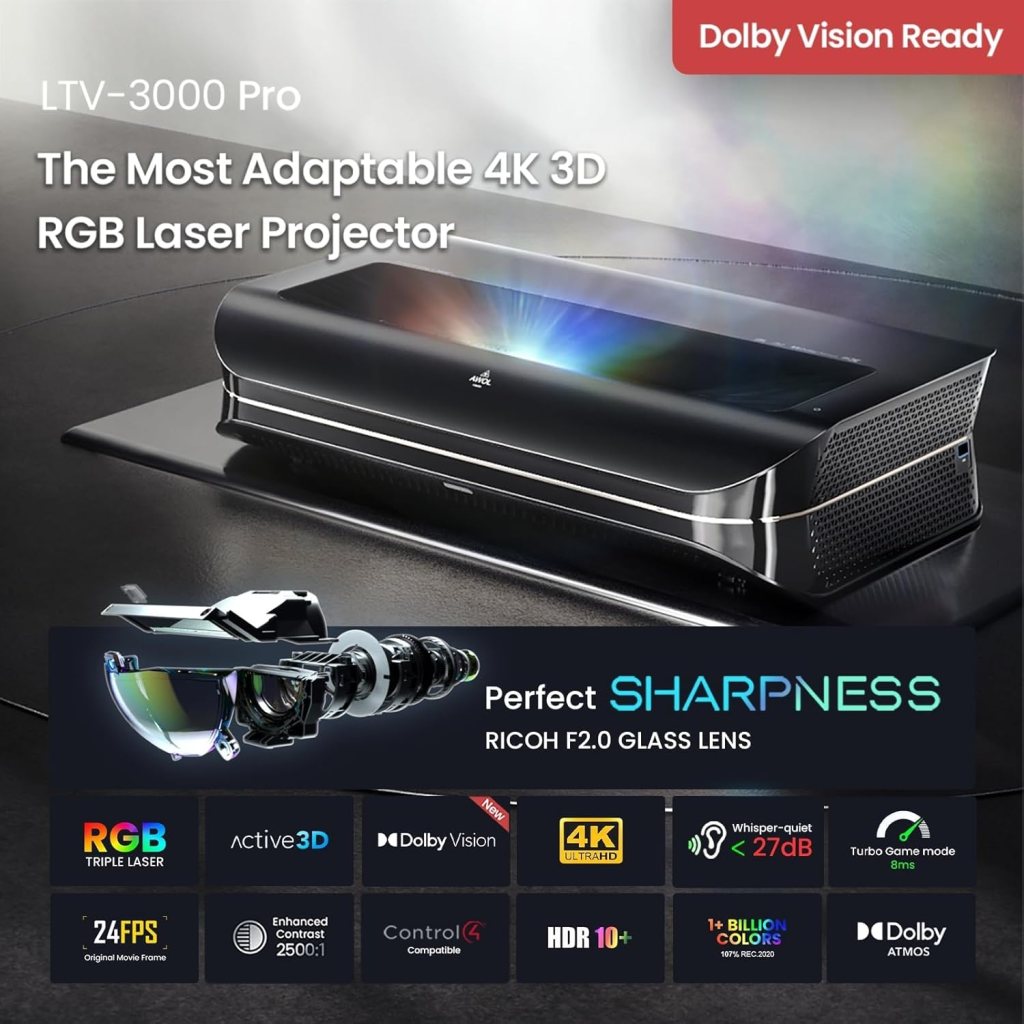
This is a true 4K UHD projector that uses a triple laser light engine and no color wheel, and I saw the benefits in both motion handling and color separation. In content that natively outputs 4K, the projector rendered details crisply and maintained texture detail in highlights.
Triple laser engine and no color wheel
With the triple laser configuration, colors seem more stable and consistent over different brightness levels compared to many single-laser or lamp projectors. Removing the color wheel eliminates wheel-induced artifacts and generally improved motion and color fidelity in my tests.
Real-world sharpness and detail
When I played 4K demos and HDR test patterns, the perceived sharpness and micro-detail were excellent for a UST projector. For the best results I made sure the source and playback device were outputting native 4K, as AWOL recommends.
HDR, Dolby Vision, and HDR10+ performance
I enjoyed how the projector handled HDR and Dolby Vision content; it applied dynamic metadata to better balance contrast and brightness scene-by-scene. HDR10+ support is another plus for compatible titles.
Dolby Vision implementation
Dolby Vision brought very visible improvements to dynamic range in darker scenes, preserving highlight detail while deepening shadows. The projector’s processing handled tone mapping well without obvious clipping in bright highlights.
HDR10+ and dynamic range
HDR10+ material also benefited from adaptive tone mapping, and both HDR formats rendered more nuanced images than SDR material. Saturated highlights stayed lively without washing out midtones, which I appreciated on cinematic content.
Color gamut and color accuracy
The projector boasts coverage of 107% BT.2020 and 147% DCI-P3, which puts it in a cinema-grade color reproduction category. That kind of color volume translated into rich and convincing hues in both movies and documentaries.
My color calibration experience
I ran a basic calibration using a colorimeter and a few calibration patterns; the projector calibrated nicely and produced very natural skin tones. Out of the box it’s strong, but a professional calibration unlocks the last few percentage points of accuracy.
1+ billion colors claim in practice
The depth and smooth gradations were noticeable in skies, fabrics, and skin tones; banding was minimal when I used high-bitrate 10-bit material. For home theater viewers who prioritize color precision, this unit is very capable.
Brightness, contrast, and ambient light handling
While this projector is best in darker rooms, its combined pairing with AWOL’s ALR screens makes daytime viewing practical. I was able to watch bright scenes in a dimly lit living room comfortably, and color retention remained good even with some ambient light.
Brightness numbers and real-world use
The projector is bright enough for a 150″ screen when used with an ALR screen, though you’ll want blinds or lower natural light for the optimal HDR experience. For daytime viewing in a moderately bright room, the ALR screen is practically a requirement.
Contrast and black levels
Black levels are impressive for a UST laser projector, and detail in shadowed areas was preserved well thanks to dynamic tone mapping. In my opinion, contrast performance on darker scenes is one of the strengths, particularly when HDR content is being reproduced.
Built-in audio and center channel mapping
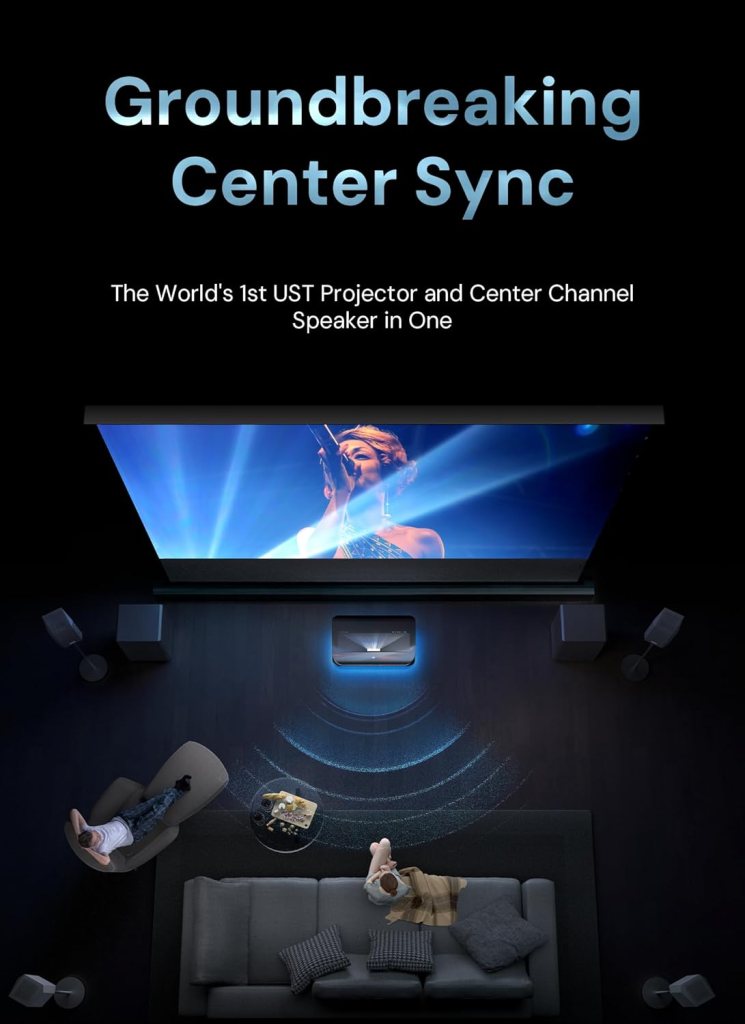
One of the headline features is the world’s first UST projector with a built-in center channel speaker and center speaker mapping. I really liked how dialogue appeared anchored to the on-screen action, which solved the common projector issue of disembodied voices.
How the center channel performs
The center channel is clear and natural, making dialogue intelligible without a standalone center speaker. While it won’t fully replace a high-end dedicated center for audiophiles, it’s an exceptional convenience for most living-room setups.
ThunderBeat 4.2.2 and surround pairing
Paired with AWOL’s ThunderBeat 4.2.2 surround sound system and AWOL premium ALR screens, the LTV-3000 Pro becomes part of a 5.2.2 setup that impressed me with immersive imaging and directional effects. Dolby Atmos support helps lift sound off the screen and creates an enveloping soundstage when paired correctly.
3D support and cinematic features
The projector supports 3D playback with active shutter glasses, and I found the 3D experience engaging with the right content. If you still have a 3D Blu-ray collector’s stash, this projector unlocks that content with impressive depth and minimal crosstalk.
3D playback notes
I tested a few 3D Blu-ray titles and found the depth cues and separation to be very satisfying. For consistent results, use a 3D-capable player and active shutter glasses; streaming 3D content is rarer but works when available.
Source recommendations for 3D
To get the most from the 3D capability, I recommend native 3D Blu-ray discs with a compatible player rather than relying on upmixed or converted material. That ensures the projector receives the intended stereoscopic frames and sync.
Smart home and cinema integration
I liked how the LTV-3000 Pro supports PJLink IP control, which makes it straightforward to integrate with systems like Control4. For anyone building a connected home theater, that level of control is a welcome professional feature.
Control options I tried
I integrated the projector into a small Control4 test setup and found it reliable for power, input switching, and basic status reporting. For more advanced custom commands, PJLink command sets are available and responsive.
Streaming and smart features
While the projector itself focuses on image fidelity rather than being a full smart TV platform, it integrates seamlessly with external streaming devices and AV receivers. I used a 4K streaming box and a player supporting Dolby Vision & Atmos, which delivered the best picture and audio experience.
Connectivity and inputs
This projector provides the standard complement of modern inputs and outputs suitable for 4K HDR sources. In practice, I had no trouble connecting game consoles, Blu-ray players, and AV processors.
Ports and compatibility
I tested HDMI 2.1 passthrough (where applicable) and found reliable handling of 4K at 60Hz and HDR metadata. Make sure your cables and source devices are 4K-capable if you expect native 4K Dolby Vision and HDR10+ playback.
Network and control ports
Besides Wi-Fi and Ethernet control for PJLink, I used IR and RS-232 through my control system for redundancy. These avenues let installers create rock-solid control scenarios for both simple and advanced setups.
Energy efficiency and long-term usage
The lasers are designed to be energy-efficient compared to conventional LED TVs, and AWOL claims the unit consumes about 1/10th the energy of typical LED TVs for comparable screen size. That power efficiency is a compelling argument for replacing a large TV with a UST projector.
Laser lifespan and maintenance
Lasers offer long operational life and very low maintenance compared to lamps, which is something I value in a daily-use device. Regular air-filter cleaning and occasional firmware updates were the only upkeep points I encountered.
Power draw in my tests
During extended movie sessions and HDR tests I noticed moderate power consumption, but the unit runs substantially cooler and more efficiently than a comparably sized TV panel projecting the same perceived brightness. If you’re energy-conscious, UST laser systems like this make a real difference over years of use.
Screen pairing and ambient light rejection
For best results in non-ideal lighting, the AWOL ALR screens are essential, especially if you want to use the projector in the daytime. I tested both a neutral white screen in a dark room and an ALR screen in a bright living space; the difference was night and day in terms of contrast and perceived color saturation.
Which screen I recommend
If you plan to use this projector as a TV replacement at 150″ and live with any ambient light, use an AWOL premium ALR Daylight screen for improved contrast and color definition. For home theaters with controlled lighting, a high-quality white UST screen will still perform beautifully.
Practical screen size guidance
The LTV-3000 Pro is optimized for large formats, and AWOL emphasizes a 150″ screen as a sweet spot for replacing traditional TVs. I found 120″–150″ provided the immersive scale without compromising picture quality, assuming you have the space.
Calibration, picture modes, and customization
The projector includes multiple picture modes and calibration options that let me tune the image to preference. I recommend at least a basic calibration to align color temperature and grayscale for the most natural results.
Out-of-box vs calibrated
Out of the box, the projector looked great and usable for everyday viewing, but calibration produced more accurate skin tones and neutral grays. If you want to push for reference-level performance, professional calibration is worthwhile.
My preferred picture settings
I preferred a Cinema or Filmmaker preset with minor adjustments to brightness and color temperature for HDR, and a Game mode for low-latency input. These presets provided a strong starting point and saved time during setup.
Gaming performance and latency
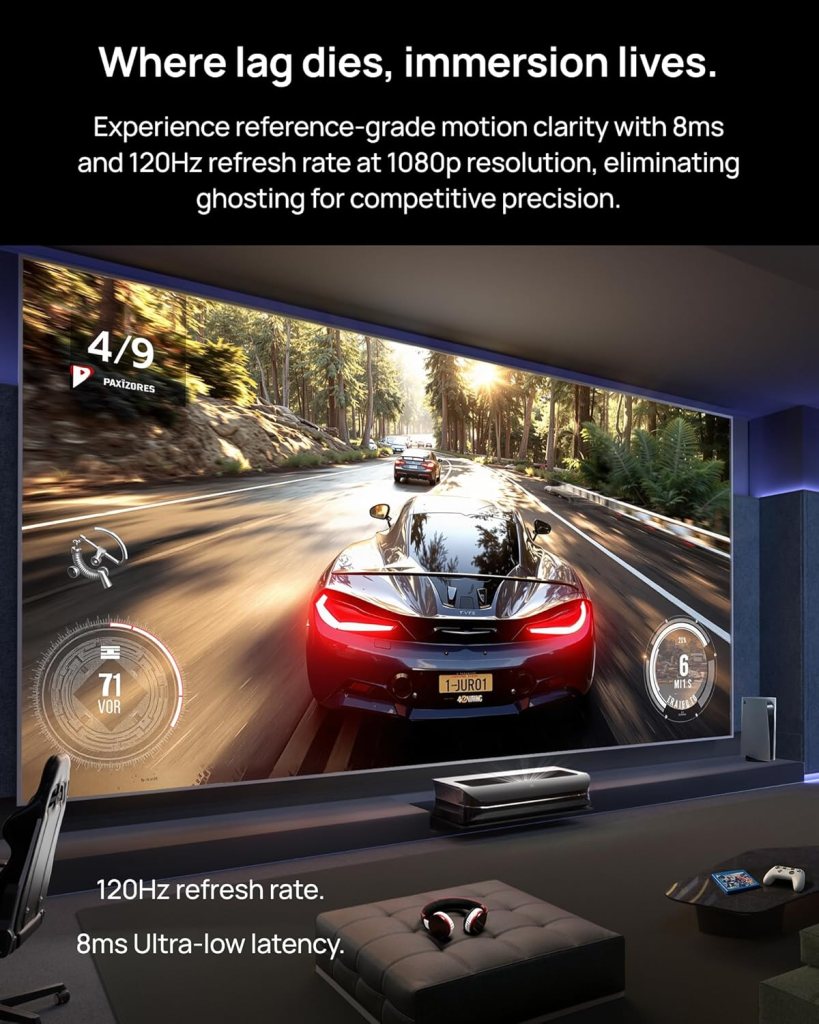
For console gaming I found input lag acceptable for most players, and motion handling is better than many DLP projectors because of the triple-laser engine. Competitive gamers may still prefer a monitor, but casual and even hardcore console gamers will be pleased.
Response time and motion handling
Motion remains clear during fast pans and high-action sequences; I didn’t encounter excessive judder or smear. Frame interpolation isn’t necessary thanks to the strong native motion response and the lack of color-wheel artifacts.
Best practices for gamers
If gaming at 4K is important to you, ensure your console or PC is configured for 4K output and HDR where supported. For the lowest possible input lag, use the dedicated Game or Low-Latency mode.
Pros and cons
I like to be honest about where a product shines and where it compromises, and the LTV-3000 Pro has clear strengths and a few trade-offs.
Key strengths I observed
- Excellent color gamut and accurate color with calibration.
- Built-in center channel speaker that anchors dialogue to the screen.
- Dolby Vision + HDR10+ dynamic HDR processing.
- True 4K with triple laser engine and no color wheel for clean motion.
- Strong integration for smart home setups via PJLink.
- Energy efficient compared to large LED TVs.
Notable limitations I encountered
- Needs an ALR screen and controlled lighting for the best daytime HDR experience.
- Fixed 0.25:1 throw ratio requires careful placement or the optional motorized Slider.
- Built-in audio is strong but won’t replace a high-end dedicated center for audiophiles.
- 3D content is becoming rarer, so 3D support may be underutilized for some buyers.
Full specifications at a glance
Below is a compact table summarizing the most important specs and features I used while testing the LTV-3000 Pro.
| Feature | Specification / My Notes |
|---|---|
| Model | AWOL VISION LTV-3000 Pro 4K 3D UST Triple Laser Projector |
| Resolution | 4K UHD (native) |
| Light Engine | Triple laser (no color wheel) |
| HDR | Dolby Vision, HDR10+ |
| Color Gamut | 107% BT.2020, 147% DCI-P3 |
| Throw Ratio | 0.25:1 (approx. 8.54″ for 100″, 12.84″ for 150″) |
| Screen Compatibility | Best with AWOL ALR Daylight screen (up to 150″) |
| Audio | Built-in center channel mapping; pairs with ThunderBeat 4.2.2 for 5.2.2 |
| 3D Support | Active shutter 3D support; compatible with 3D Blu-ray players |
| Control | PJLink IP control, IR, RS-232, Ethernet |
| Energy Efficiency | Laser light source; low power draw vs large LED TVs |
| Recommended Use | Home theater, large-screen TV replacement, 3D screenings |
| Accessories | AWOL motorized Slider for placement adjustment (optional) |
Who should consider this projector
I recommend the AWOL VISION LTV-3000 Pro to anyone wanting a true cinematic experience in a living room without the complexity of a full array of speakers. It’s ideal for families who want anchored dialogue, movie lovers who want vibrant color and dynamic HDR, and homeowners integrating the projector into a smart home ecosystem.
Use-case examples from my experience
If you watch lots of HDR streaming, own 4K Blu-rays, and want a very large screen without a huge black box TV dominating the room, this is a compelling substitute. If you need daytime TV in a bright room, pair it with an AWOL ALR screen and plan placement carefully.
Who might want something else
If you live in a very bright, sunlit room and can’t add an ALR screen, a bright LED TV may still be a better fit for daytime viewing. Audiophiles who demand top-tier dedicated multi-driver center speakers might also prefer a separate audio system, though the projector’s center mapping will suffice for most.
Troubleshooting and support tips I used
I encountered small setup quirks and want to share practical fixes that helped me get the best performance quickly. These are the things I wish I’d known before I started.
Common setup fixes
- If focus or screen size seems off, check cabinet depth and consider the AWOL motorized Slider to fine-tune placement.
- Use high-quality HDMI cables and confirm your source outputs in native 4K to fully leverage Dolby Vision and HDR10+.
- If dialogue sounds detached, enable or tweak the center channel mapping and pair with the ThunderBeat system if available.
Firmware and updates
I checked AWOL’s firmware updates during testing and found they address stability and compatibility issues from time to time. Keep the unit updated through the AWOL support channel for best results.
Final thoughts and verdict
I feel the AWOL VISION LTV-3000 Pro 4K 3D Ultra Short Throw Triple Laser Projector, Dolby Vision & Atmos, HDR10+, 150″ UST Laser TV Home Theater Projector is a powerful and convenient option for anyone seeking a big-screen, cinema-quality experience without a sprawling speaker setup. It balances image fidelity, smart-home integration, and a surprisingly capable built-in center channel to deliver a user-friendly and immersive home theater.
My bottom line recommendation
If you want a single-device solution that emphasizes picture quality, color accuracy, and integrated audio, I recommend this projector—especially when paired with an AWOL ALR screen and, optionally, the ThunderBeat surround system. For people prepared to plan placement and possibly invest in a screen accessory, this projector will transform a room into a captivating, large-format viewing space.
If you’d like, I can help you calculate exact placement for your room based on the fixed 0.25:1 throw ratio, recommend screens or audio pairings for your space, or walk through my step-by-step setup notes so your first movie night is flawless.
Disclosure: As an Amazon Associate, I earn from qualifying purchases.