


Thinking about upgrading your home cinema setup with the JMGO N1S Ultimate Triple Laser 4K Projector?

Quick verdict
You’re looking at a premium laser projector that aims to bridge the gap between living-room convenience and high-end home theater performance. The JMGO N1S Ultimate Triple Laser 4K Projector promises bright, color-accurate images, smart streaming via Google TV, robust audio, and flexible projection angles, making it a strong contender if you want a single device that handles movies, sports, and outdoor screenings.
Key specifications at a glance
This table breaks down the core specs so you can get a quick sense of what the JMGO N1S Ultimate offers. Use this as a reference while reading the rest of the review so you can match features to your needs.
| Feature | Specification |
|---|---|
| Model | JMGO N1S Ultimate Triple Laser 4K Projector |
| Brightness | 3300 ISO lumens (Daylight-Ready) |
| Resolution | 4K (via Triple Laser tech) |
| Contrast Ratio | 1600:1 |
| Color Accuracy | ΔE < 1 |
| Color Gamut | 110% Rec. 2020 |
| Color Depth | 10-bit |
| HDR Support | HDR10 |
| Audio | 20W with subwoofer, Dolby Digital+ and DTS-HD Master Audio |
| Smart OS | Google TV 3.0 (Netflix certified) |
| Sensors | 3D-TOF sensor and CMOS camera for Auto Screen Fit, real-time keystone and focus |
| Rotation | 360° horizontal, 135° vertical gimbal |
| 3D | Blu-ray 3D support |
| Ports | HDMI, USB, Ethernet, Audio out (see Ports table below) |
| Use cases | Home theater, living room, backyard, camping |
| Other | Real-time Auto Screen Fit, FlexiSmart 2.0 adaptive system |
Ports and physical connectivity
You’ll want to know what’s on the projector for hooking up consoles, players, and external sound. This small table summarizes typical I/O.
| Port | Purpose |
|---|---|
| HDMI (x2) | Connect Blu-ray player, consoles, streaming boxes |
| USB (x2) | Media playback, service, or USB storage |
| Ethernet | Stable streaming or large app downloads |
| 3.5mm / Optical / Audio out | External sound system or headphones |
| Power | Standard projector power input |

Design and build
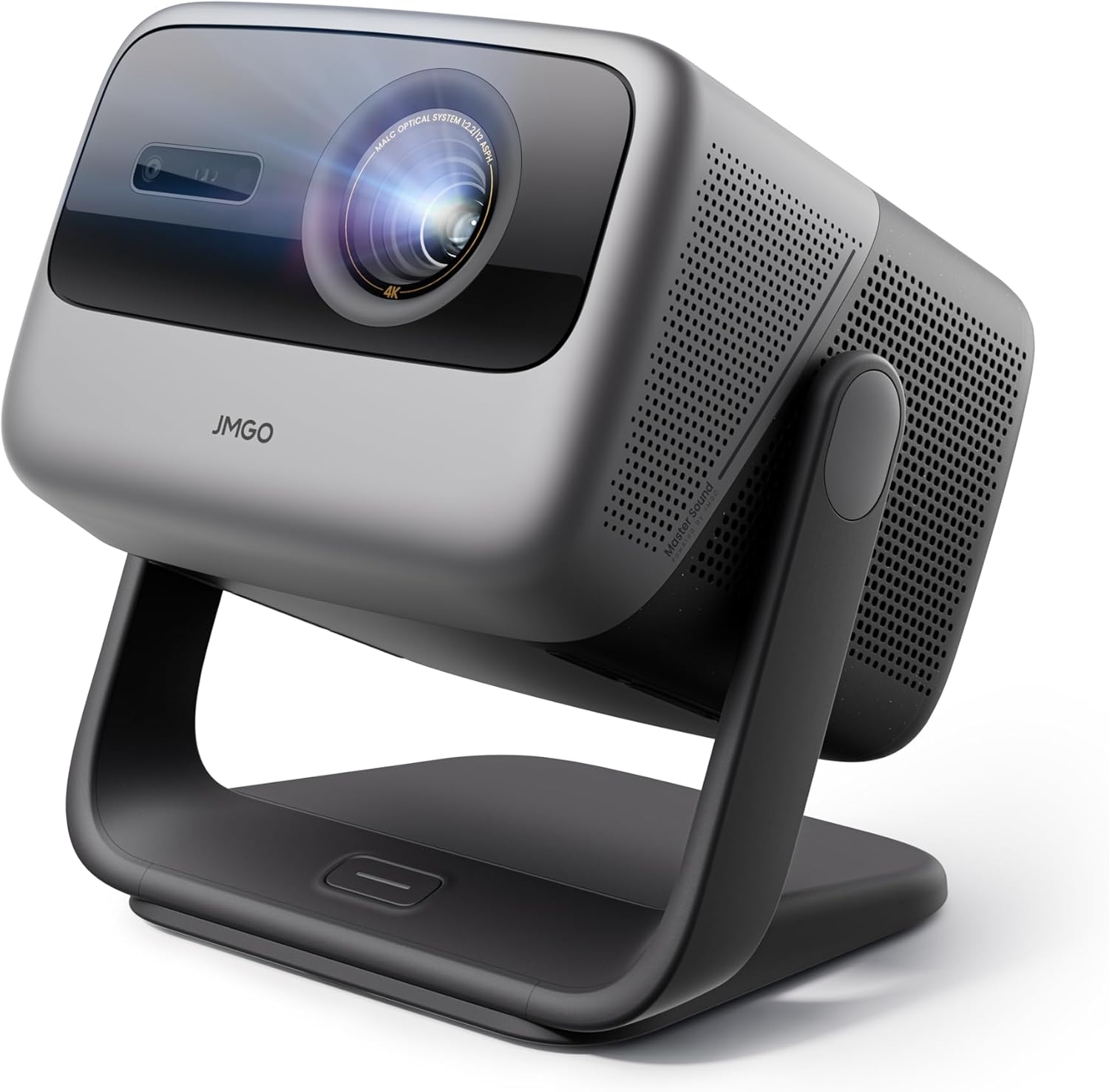
The JMGO N1S Ultimate looks like a polished piece of consumer electronics rather than a bulky pro-theater unit. The housing is compact enough to sit on a low shelf or portable tripod, and the gimbal design gives you a lot of freedom to point the image where you need it without resorting to complex mounts.
You’ll notice a premium finish and good build quality when you pick it up. The cooling vents are thoughtfully placed to manage heat while keeping fan noise unobtrusive for movie watching.
Size and weight
The unit is lighter and less obtrusive than many large projectors, which makes it easier for you to move between rooms or set up outdoors. You’ll find it manageable if you plan to carry it to a backyard movie night or a campsite.
Despite being portable, the projector still feels durable and stable on a flat surface. Its gimbal and foot adjustments minimize the need for extra hardware for most casual installations.
Controls and remote
You get an intuitive remote and on-device controls that make initial setup straightforward. The remote typically includes quick-access buttons for Google Assistant and Netflix, which saves time when you want to jump into your favorite streaming content.
If you prefer voice control, the Google Assistant integration makes navigation hands-free and quick. You’ll appreciate not fumbling through menus when you’re ready to watch.
Brightness and daylight performance
One of the standout claims is the 3300 ISO lumens rating, labeled as “Daylight-Ready.” In practical terms, that means the projector can produce usable images in rooms with ambient light and even for backyard screenings after sunset.
You’ll get bright highlights and punchy midtones in many lighting conditions, though for the absolute best contrast you’ll still prefer a dimmer room or an outdoor screen after dusk. For daytime living-room use or well-lit family areas, the bright output is a major practical advantage.
How brightness compares in real use
Under moderate ambient light, colors remain more readable and whites better defined than with many lower-lumen projectors. However, direct sunlight will still wash out any projected image, so don’t expect daytime projection in full sun. You’ll be able to host evening backyard movies and still maintain strong picture quality.
For typical home use—TV shows, sports, movies—this brightness level keeps content engaging while reducing the need to blackout a room completely.

Color accuracy, gamut, and contrast
With ΔE < 1 color accuracy and 110% Rec. 2020 gamut coverage, the projector targets very faithful color reproduction. You’ll notice vibrant, lifelike colors, especially with well-mastered 4K HDR content.
The quoted contrast ratio of 1600:1 helps blacks look deeper than many bright portable projectors, though it’s still behind the absolute black levels produced by true dark-room projectors or high-end lasers with contrast enhancement. For most viewers, the balance between brightness and color fidelity will feel excellent for cinematic content.
10-bit color depth and HDR10
10-bit color depth reduces banding and helps smooth gradients in sunsets, skin tones, and other subtle scenes. HDR10 support boosts dynamic range for compatible sources, allowing brighter highlights and more detailed shadows.
You’ll get more depth and cinematic pop with HDR content, but the viewing environment still matters. In a controlled dim room, HDR benefits are most pronounced; in moderate ambient light, you’ll still enjoy richer highlights and color.
Triple laser technology and resolution
The “Triple Laser” part of the name is significant: separate red, green, and blue laser sources typically deliver more saturated colors and better long-term color stability than single-laser phosphor designs. The native imaging engine works to present a 4K-like result that’s crisp and detailed.
You’ll notice good sharpness on text, menus, and detailed movie scenes. The 4K presentation combined with accurate color science helps the projector render modern streaming and physical media cleanly.
Motion handling and processing
Motion handling is generally smooth for film and TV thanks to modest frame interpolation and processing in the FlexiSmart system. You’ll see less blur during sports and fast action compared with cheaper projectors, though extreme fast-paced gaming could reveal the limits depending on input lag and processing choices.
If motion interpolation is a personal preference, you have control over processing settings so you can favor smoothing or a more natural cinematic cadence.

FlexiSmart 2.0: auto keystone, focus, and adaptive features
FlexiSmart 2.0 is the adaptive system that powers real-time auto keystone correction, focus, and other adjustments using a 3D-TOF sensor and a CMOS camera. For you, that translates to quick setup and consistent image framing without fiddly remotes or manual adjustments.
The auto keystone and focus work in real time to keep the image sharp and rectangular even if you move the projector or change distance. This is particularly helpful if you plan to reposition the projector often or use it in unconventional angles like projecting to a side wall or a curved surface.
Real-Time Auto Screen Fit
Real-Time Auto Screen Fit scans and adapts the projection to your wall or screen, preserving aspect ratio and minimizing cropping. You’ll appreciate that the device adjusts to different wall colors and textures to maintain tone and color fidelity as best as possible.
The system isn’t flawless—extreme wall textures or busy patterns can confuse auto-calibration—but for most home environments it dramatically reduces setup time.
Sound quality and built-in audio
The JMGO N1S Ultimate comes with a 20W subwoofer and claims 45Hz ultra-bass, paired with Dolby Digital+ and DTS-HD Master Audio support. For built-in audio, that’s exceptionally capable and will satisfy many users without an external soundbar.
You’ll experience fuller low end than most projector speakers, clearer dialogue, and more immersive soundscapes in movies. Music playback is also credible, making the unit useful for casual listening when pairing with the projector itself.
When to use external audio
If you’re an audiophile or want true theater-level bass and separation, you’ll still prefer a dedicated AV receiver and speaker setup. The projector’s audio is very good for standalone use, but an external system will give you more room-filling dynamics, sub-bass extension, and multi-channel surround immersion.
For everyday watching or a backyard movie night, the onboard audio should impress most guests.

Smart features and streaming
You get Google TV 3.0 built in, with certified Netflix access and a huge catalog of apps via the Google Play ecosystem. You’ll have one-touch access to major streaming services, voice control with Google Assistant, and over 10,000 apps and 800+ free channels.
Casting is seamless with Google Cast, so you can push content from a phone, tablet, or laptop without complicated pairing. If you like the convenience of an all-in-one streaming device built into your projector, this is exactly that.
Software updates and app reliability
Google TV is a mature platform with frequent updates, and Netflix certification ensures smooth playback of high-bitrate streams and profiles. You’ll still occasionally need to update apps or the system for best compatibility, but the projector’s connectivity options and Ethernet port help make that painless.
App performance is generally responsive, and the integration of voice control and Chromecast-style casting provides modern ease-of-use.
Gaming and input lag
For console gaming and casual competitive play, the projector performs respectably. Input lag depends on the source and processing settings, but JMGO’s processing modes often include a low-latency option to minimize delay.
You’ll want to switch on game mode for fast-paced shooters or racing titles. While the projector might not quite match the lowest-latency gaming monitors, it offers a satisfying big-screen gaming experience for consoles like PS5 and Xbox Series X.
Frame rate and variable refresh considerations
If you use variable refresh rate enabled devices, check how the projector handles VRR passthrough. For many users, 60Hz console gaming and synchronized frame presentation will be fine, but competitive PC gamers demanding sub-20ms latency may find a dedicated gaming display preferable.

3D and Blu-ray support
If you still enjoy 3D Blu-rays, the JMGO N1S Ultimate supports Blu-ray 3D playback which is rare among modern projectors. You’ll be able to watch compatible discs with the proper player and glasses, delivering a true home-theater 3D experience.
The projector’s brightness helps maintain usable 3D image levels, which often suffer with darker projectors due to the loss of light from active or passive 3D systems.
Practical notes on 3D viewing
3D requires compatible content and usually specialized glasses, so you’ll need to factor that in if it’s a priority. For occasional 3D viewing, the feature adds value and shows JMGO’s intent to support a wide range of media formats.
Projection angles, mounting, and placement options
With a 360° horizontal and 135° vertical rotation gimbal, you can place the projector almost anywhere and still achieve correct framing. This flexibility makes it easier to set up in unconventional spaces or to share a screen across multiple surfaces.
You’ll benefit from less reliance on precise placement or ceiling mounts. If you like rotating the image for different rooms or outdoor setups, the gimbal is a huge convenience.
Ceiling mount and tripod use
While the projector is built for flexible placement, it also responds well to conventional mounting for permanent home theater installations. Use a ceiling mount or a sturdy tripod, and the auto-fit features will help you fine-tune the image without lengthy manual adjustments.
Outdoor and backyard use
The lumen rating and gimbal flexibility make this projector a solid choice for backyard or patio movie nights. You’ll get bright images that remain watchable even with some ambient lighting, and the built-in audio can handle small gatherings without external speakers.
You’ll still want to schedule screenings after sundown for the best contrast. Using a dedicated outdoor screen will improve image quality over projecting onto a textured wall.
Weather, power, and setup tips
For outdoor use, remember to protect the projector from moisture and dust. Use a covered area or pop-up canopy, and consider a portable surge protector or power extension. Since the unit isn’t designed to be left outdoors permanently, bring it inside after the event.
Calibration and picture modes
You’ll find multiple picture modes designed for different content: cinema, sports, gaming, and more. Calibration out of the box is often good thanks to the color accuracy goals, but you can fine-tune settings for your environment if you want reference-level results.
You’ll notice improved performance with a basic calibration—adjusting brightness, contrast, color temperature, and gamma will help you squeeze the best possible image from the projector.
Professional calibration options
If you want truly reference-grade color, a professional calibration or a colorimeter can take you further. The hardware and color gamut are capable; it’s mostly about aligning the settings to the specific room and screen.
Maintenance, longevity, and laser life
Laser projectors usually require less maintenance than lamp projectors because there’s no bulb to replace and color decay is slower. You’ll still want to keep vents clean and firmware updated, but the long service life of laser diodes makes this a low-maintenance option.
Expect years of usable performance before any significant brightness decline, assuming you keep the unit well-ventilated and dust-free.
Firmware and service
JMGO typically provides firmware updates to improve features and fix bugs. If you encounter issues, their support and update channels can resolve many problems remotely. Keep your serial and purchase information handy for warranty service or repairs.
Connectivity and expandability
The unit includes common ports and wireless options so you can connect consoles, Blu-ray players, external sound systems, and USB media. The inclusion of Ethernet helps with stable streaming, particularly for high-bitrate 4K content.
You’ll find that adding a soundbar or AV receiver is straightforward via HDMI ARC/eARC or dedicated audio outputs, expanding the projector into a full AV hub.
Third-party devices and compatibility
Most modern devices—Apple, Android, PC, and streaming boxes—play nicely with the Google TV environment and HDMI inputs. If you rely on legacy equipment, you may need adapters, but basic compatibility is strong.
Pros and cons
This quick list helps you weigh strengths and weaknesses so you can decide whether the JMGO N1S Ultimate fits your priorities.
Pros:
- Bright 3300 ISO lumens for versatile use in ambient light
- Triple laser color technology with ΔE < 1 accuracy and 110% Rec. 2020 gamut
- Google TV 3.0 with Netflix certification and Google Assistant
- Real-time Auto Screen Fit and FlexiSmart 2.0 for effortless setup
- Built-in 20W audio with Dolby Digital+ and DTS-HD Master Audio
- 360° horizontal and 135° vertical gimbal for flexible placement
- Blu-ray 3D support and HDR10
Cons:
- Contrast ratio (1600:1) is solid but not on par with top dark-room Laser projectors
- True black levels and shadow detail still benefit from darker viewing environments
- For audiophiles, external sound systems will still be preferable
- Price point may be above casual or budget projector buyers
How it compares to alternatives
If you’re deciding between this projector and similarly positioned competitors, the JMGO N1S Ultimate stands out for color fidelity, built-in smart features, and integrated audio. Competitors may offer either higher contrast in dark rooms or lower cost, but few combine the same level of convenience and all-in-one appeal.
You’ll need to weigh whether you prioritize absolute contrast and cinema-grade blacks (in which case a sealed-laser projector or OLED display might appeal) or a bright, flexible system that works well in family rooms and outdoors.
Who should buy this
Buy this if:
- You want a high-quality, bright projector that works in ambient light.
- You value color accuracy and 4K-level detail for movies and streaming.
- You want a smart, self-contained system with Netflix certification and Google TV.
- You need flexible placement options and occasional outdoor use.
Don’t buy this if:
- You require the deepest possible black levels for a dedicated dark-room theater.
- You’re a competitive gamer who needs the absolute lowest input lag.
- You need a projector under a strict low budget.
Practical setup checklist
When you unbox and set up the JMGO N1S Ultimate, follow this checklist to speed up the process and get the best image:
- Find a stable surface and ensure adequate airflow around vents.
- Connect HDMI sources and any external audio devices.
- Power on and run the FlexiSmart auto-calibration for keystone and focus.
- Choose a picture mode (Cinema or Custom recommended) and adjust brightness/contrast.
- If possible, dim ambient lights or use a projector screen for improved contrast.
- Update firmware via Wi-Fi or Ethernet for latest features and stability.
- Calibrate colors manually or with a meter for reference accuracy if desired.
Frequently asked questions (FAQ)
You’ll probably have a few common questions if you’re considering this projector. Here are answers to frequent queries.
Q: Can it replace a TV for everyday viewing?
A: Yes. With Google TV and built-in speakers, it’s a practical TV replacement, especially if you prefer a large screen experience. Keep in mind the need to manage ambient light and occasional lamp maintenance is not needed thanks to laser.
Q: Is the projector loud?
A: Fan noise is present but generally unobtrusive during normal playback. The cooling system is tuned for quiet operation, and audio usually masks any background fan noise.
Q: Do you need a special screen?
A: You don’t strictly need one, but a proper projector screen will improve contrast, color uniformity, and brightness compared with bare walls—especially for serious movie nights.
Q: How long do the lasers last?
A: Laser life is long—typically many thousands of hours—so you shouldn’t worry about frequent replacements like you would with lamps. Exact lifetime may vary by use and manufacturer estimates.
Q: Does it support 4K Blu-ray?
A: Yes, via compatible 4K Blu-ray players and HDMI connections. The projector supports HDR10 and provides a strong 4K viewing experience.
Final verdict
If you want a versatile, bright, and color-accurate 4K projection system that’s easy to set up and packed with modern smart features, the JMGO N1S Ultimate Triple Laser 4K Projector is a compelling option. You’ll appreciate the vivid colors, strong brightness for ambient light use, built-in audio, and Google TV convenience for streaming.
It’s not a pure reference theater projector for absolute black-level perfection, but for most users who want a single device that handles living-room movies, backyard screenings, gaming, and streaming with minimal fuss, this projector hits a strong balance of features and performance. If you prioritize convenience, color, and flexibility, the JMGO N1S Ultimate is well worth considering.
Disclosure: As an Amazon Associate, I earn from qualifying purchases.