

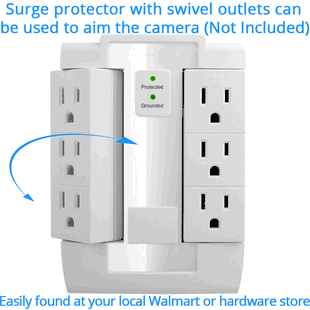
Are you looking for a discreet way to monitor caregivers, protect children, or check on your home while keeping the device unobtrusive?

kawtco Wi‑Fi hidden spy camera in a functional USB phone charger for covert nanny monitoring
This article explains how the kawtco Wi‑Fi hidden spy camera built into a working USB phone/device charger works, what it can and cannot do, and how you can set it up safely and legally. You’ll get technical specs, setup steps, storage and playback options, practical tips for positioning, troubleshooting guidance, and legal/ethical reminders so you can make an informed decision.
What this product is and how it looks
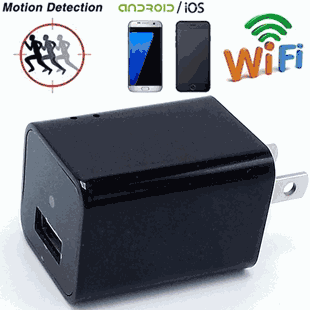
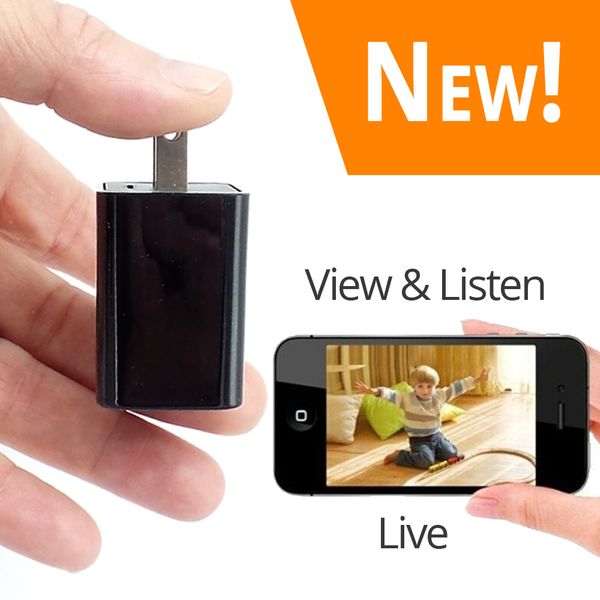
You’ll see a device that looks and behaves like a normal USB charger. The kawtco unit charges your phone or other devices while hiding a small camera and microphone inside the charger housing. It’s intended for discreet nanny monitoring or general indoor surveillance when used legally.
The design aims to blend into ordinary home environments: it plugs into an outlet and provides a standard USB port for charging. The camera lens and microphone are concealed so guests, family members, or caregivers are unlikely to notice them during routine use.
Key features at a glance
You’ll appreciate the main features that make this device practical for simple, low-cost monitoring.
- Covert 1080p HD video and audio recording in a disguised USB charger.
- Live remote viewing and listening over Wi‑Fi through a mobile app or browser.
- Motion detection with push alerts and automatic screenshot capture.
- Local recording to removable micro SD (TF) card up to 128 GB, or streaming/recording via Wi‑Fi without mandatory monthly fees.
- Simple setup via QR code or in‑app search for Android and iOS devices.
- Functions as a normal USB charger while recording (powering phones and other devices).
- Requires 2.4 GHz Wi‑Fi for remote features (won’t work on 5 GHz-only networks).

Technical specifications
This compact table summarizes the main technical specs so you can quickly compare capabilities.
| Category | Specification |
|---|---|
| Video resolutions | 1080p / 720p / 640p |
| Compression | H.264 |
| File format | AVI |
| Frame rate | 25 fps |
| Field of view | 90° |
| Minimum illumination | ~1 LUX |
| Audio | Built-in microphone (live listening + recorded audio) |
| Motion detection | Yes — push alerts & screenshot |
| Storage | TF/micro SD card slot, up to 128 GB (SD not included unless purchased) |
| Remote access | Live view and listening via app; works over Wi‑Fi (2.4 GHz) |
| Compatibility | iOS, Android; Windows/Mac viewing via software/browser |
| Power | Functions as a normal USB charger; records while plugged in |
| Network | 2.4 GHz Wi‑Fi required; many routers are dual‑band (2.4 + 5 GHz) |
| Included | Camera charger unit, USB cable, user manual, CD |
| Support | Lifetime tech premium support; optional extended warranty |
Video, audio, and recording details
You’ll want to understand the quality and limitations of the recorded and streamed media.
Resolution and frame rate
- The camera records at up to 1080p resolution, with options for 720p and 640p. Recording at 25 fps provides smooth motion for typical indoor scenes.
- You can choose a lower resolution to save storage or bandwidth during streaming.
Compression and file format
- Video is compressed with H.264 and saved as AVI files. H.264 balances image quality and file size effectively for continuous recording.
- The AVI container makes playback straightforward on most media players like VLC or SMPlayer.
Low light performance
- The minimum illumination is around 1 LUX, so the camera can record in dim indoor lighting but won’t perform as well in complete darkness unless additional lighting is available.
Audio
- The built-in microphone captures audio for local recordings and live listening. Audio quality is suitable for general monitoring but will vary with distance and background noise.
Motion detection and alerts
- Motion-triggered recording reduces unnecessary footage and preserves storage. When motion is detected, the device can send push alerts and capture screenshots to the paired mobile device.

Storage and playback options
You’ll have flexible ways to save and watch footage depending on how you prefer to manage recordings.
Local (micro SD / TF card)
- The camera has a TF/micro SD slot that supports cards up to 128 GB. You can choose to have the device record only to SD (standalone mode) so no internet or app is required for recording.
- Playback is simple: remove the micro SD card and connect it to your PC or Mac. Software like VLC or SMPlayer will play the AVI files.
Streaming and remote recording
- If you connect the device to your home Wi‑Fi (2.4 GHz), you can stream live footage to your phone or PC and in some setups record remotely to a networked device or cloud (depending on app features). The product does not require mandatory monthly cloud fees—local storage to SD is sufficient.
Recommended SD cards
- Choose a reliable micro SD card, class 10 or UHS‑I recommended, from a reputable brand. If you want long continuous recording times, pick 64 GB or 128 GB.
Approximate recording times (estimates)
- These are rough estimates for continuous recording based on typical H.264 bitrates. Actual results will vary with scene complexity and bitrate settings.
| Resolution | Estimated bitrate | Hours per 16 GB | Hours per 32 GB | Hours per 64 GB | Hours per 128 GB |
|---|---|---|---|---|---|
| 1080p | ~2.5 Mbps | ~3.5 hrs | ~7 hrs | ~14 hrs | ~28 hrs |
| 720p | ~1.5 Mbps | ~6 hrs | ~12 hrs | ~24 hrs | ~48 hrs |
| 640p | ~1.0 Mbps | ~9 hrs | ~18 hrs | ~36 hrs | ~72 hrs |
Note: These are approximations. Motion-triggered recording extends these durations since footage is captured only when movement occurs.
Setup and compatibility
You’ll find setup options that are designed to be accessible even if you don’t have advanced technical skills.
Mobile app setup
- The device supports setup by scanning a QR code on the camera or by searching for the device in the app. The app works with iOS and Android.
- After adding the camera, follow the in‑app prompts to connect it to your 2.4 GHz Wi‑Fi network and register or login if required by the app.
Windows/Mac and browser viewing
- You can view multiple cameras in the same app on mobile and use companion software or modern browsers on Windows/Mac for monitoring. Some features may require installing a small client or browser plugin provided by the manufacturer.
2.4 GHz requirement
- The camera requires a 2.4 GHz Wi‑Fi network. If your router is dual‑band (many are), ensure the camera connects to the 2.4 GHz SSID. It will not connect to a 5 GHz-only network.
Multi-camera setup
- The app supports viewing multiple kawtco cameras on the same account or within the same local network, which is useful if you want more than one viewing angle.
Step-by-step simple setup (common flow)
- Plug the charger camera into power and ensure it boots.
- Install the recommended mobile app from the App Store or Google Play.
- Open the app and add a new device by scanning the QR code on the unit or selecting the in‑app search option.
- Enter your 2.4 GHz Wi‑Fi credentials when prompted.
- Wait for the app to connect to the camera and verify live video.
- Insert a micro SD card if you want local recording; format it in the app or camera if necessary.
- Configure motion detection, recording schedule, push alerts, and image quality in the app settings.
Physical operation and power
You’ll appreciate that this device performs its advertised charging function while recording.
Normal charger behavior
- The unit supplies power to phones or other USB-powered devices while the camera is active. That makes it unobtrusive, because charging is a normal activity in most homes.
Continuous power for recording
- Because it plugs into AC power while charging devices, continuous recording is feasible without the limitations of a battery-operated camera. Use of an SD card for local recording gives you continuous capture without relying on cloud streaming.
Form factor and concealment
- The charger-like form means it blends in with bedside tables, living room outlets, or kitchen countertops. Still, remember that anyone inspecting outlets up close could discover the camera, so concealment is not guaranteed.
Security and privacy considerations
You’ll need to secure the device and respect privacy laws when using this camera.
Network security
- Change any default passwords and use a strong Wi‑Fi password with WPA2 (or WPA3 if supported). Consider creating a guest or IoT-specific network for cameras if your router supports multiple SSIDs.
- Avoid using weak passwords or leaving remote access features exposed without encryption. If remote viewing requires port forwarding, understand the risk and secure it properly or use the app’s cloud relay if available.
Firmware and app updates
- Keep the camera firmware and app up to date. Updates often include security fixes and improved stability.
Privacy and legal use
- You are responsible for ensuring the camera is used legally. Laws vary by country, state, and municipality. Many places permit video recording in private spaces you own, but prohibit audio recording or video capture where people have an expectation of privacy (bathrooms, locker rooms), or secret recordings of adults without consent.
- For nanny monitoring, consider informing caregivers and caregivers’ rights in your jurisdiction. Transparent policies and legal compliance reduce risk and protect relationships.
Local-only mode for privacy
- If you’re concerned about exposing footage over the internet, you can operate the device in SD-only mode: record to the micro SD card without connecting to Wi‑Fi. This keeps footage local and avoids cloud exposure.
Included items and support
You’ll receive a few items in the package and ongoing technical support.
Included in the box
- Camera unit (disguised as a USB charger)
- USB cable (for power/data depending on model)
- User manual
- CD (likely containing software or manual; many modern devices provide downloads online)
Optional and purchasable extras
- Micro SD cards (16–128 GB) may be sold separately by the vendor; choose capacity based on your needs.
- Optional extended warranty may be available for purchase.
- Lifetime tech premium support is often included, so you can get assistance with setup and troubleshooting.
Practical placement tips for nanny monitoring
You’ll want to position the unit to capture meaningful footage while remaining discreet.
Where to place it
- Place the charger in common areas where caregivers spend time: living room outlets near seating, a kitchen counter outlet used frequently, or a bedside outlet if you want to monitor overnight babysitters.
- Aim for a height where the 90° field of view covers the area of interest. A higher placement can give a more complete view of the room.
Avoiding interference and obstructions
- Keep the lens unobstructed by cords or objects. Avoid placing it behind curtains or near bright windows that can create backlighting and reduce image quality.
- Keep the power adapter stable so it doesn’t move or tilt, which could change the viewing angle unexpectedly.
Testing and adjustments
- After setup, test live view from your phone and record a short sample clip to check framing, lighting, and audio. Adjust position as needed until you’re satisfied.

Troubleshooting common issues
You’ll be able to resolve many problems with a few simple checks.
No live view or connection
- Confirm the device is on and connected to the 2.4 GHz Wi‑Fi network.
- Make sure your phone is on a network that allows the app to communicate with the camera (local network permissions may be necessary).
- Restart the device and router if connection issues persist.
Poor video quality or lag
- Check resolution and bitrate settings in the app; lower settings reduce bandwidth use but decrease image quality.
- If streaming remotely, your upload speed at home determines smoothness. Use lower resolution if upload bandwidth is limited.
Motion detection not triggering
- Verify motion detection is enabled and sensitivity is set appropriately in the app.
- Make sure the camera has a clear line of sight to the motion area; small objects or low-contrast movement may not trigger detection.
Micro SD issues
- If the camera won’t record or says the card is full, format the card in the camera or app (back up any needed files first).
- Use a high-quality, recommended-speed card (Class 10/UHS‑I), and avoid counterfeit cards.
App login or cloud features failing
- Make sure you’re using the official manufacturer app and that your account credentials are correct.
- If cloud connectivity fails, try local-only operation to record to SD.
Pros and cons
This quick list helps you weigh advantages and limitations so you can decide whether this product suits your needs.
Pros
- Concealed in a functional USB charger for discreet monitoring.
- 1080p video quality with options for lower resolutions.
- Local recording to micro SD up to 128 GB—no mandatory monthly fees.
- Motion detection with push alerts saves storage and draws your attention to events.
- Live remote viewing and listening via app for convenience.
- Works as a normal charger while recording.
Cons
- Requires 2.4 GHz Wi‑Fi for remote features—won’t connect to 5 GHz-only networks.
- Concealment can be compromised if anyone inspects the outlet or charger closely.
- Audio quality is limited by a small built-in microphone; distant sounds may be faint.
- Low-light performance is limited (minimum ~1 LUX), so footage in very dark conditions will be poor.
- Legal and ethical risks if used without consent where prohibited.
Comparison with other nanny cam types
You’ll want to know how this device compares to standalone cameras or other disguised options.
- Versus standalone indoor Wi‑Fi cameras: Charger cam blends into normal home items and offers dual function (charging + camera). Standalone cameras often offer better lenses, night vision, and more robust audio, but are more obvious.
- Versus other disguised cameras (clock, smoke detector, bulb): Many disguise types are similar in purpose. Charger cams are convenient if outlets exist where you need coverage; bulb cams need a light fixture; clocks require a visible placement.
- Versus battery-powered cams: Charger cams offer continuous power without battery swaps, but they require an outlet.
Legal and ethical reminders
You’ll want to be careful about how and where you use concealed cameras.
- You are responsible for ensuring legal use in your area. Laws vary: some jurisdictions permit monitoring in private homes you own, while others require consent for audio or prohibit recording in private spaces.
- Never use a hidden camera for illegal surreptitious surveillance, stalking, or to record people in spaces where they have a reasonable expectation of privacy (bathrooms, changing areas).
- For nanny monitoring, consider informing caregivers and using written policies or agreements if your local law or employment rules require notification.
- If you plan to use footage as evidence or in disputes, consult local legal guidance to ensure it’s admissible and collected lawfully.
Frequently asked questions (FAQs)
You’ll likely have practical questions before purchasing or using this camera. Here are common ones and short answers.
Q: Will the charger look suspicious if someone inspects it closely? A: It’s designed to look like a normal charger, but a close inspection (feel, weight, or noticing a tiny lens) could reveal it. Concealment reduces discovery risk but doesn’t eliminate it.
Q: Do I have to pay a monthly fee to use live viewing? A: No. The product supports local recording to micro SD with no mandatory monthly fees. Some remote features or cloud services (if offered) can be optional and may charge fees.
Q: Can I watch live video from outside my home? A: Yes, if you configure the camera to connect to your 2.4 GHz Wi‑Fi and enable remote viewing via the app. Remote access exposes the device to the internet, so ensure strong security settings.
Q: What if my router only has 5 GHz? A: The camera requires 2.4 GHz. Many modern routers are dual‑band; check your router’s settings and enable a 2.4 GHz SSID. If your router is 5 GHz only, the camera will not connect wirelessly.
Q: How do I protect the footage from being accessed by others? A: Use strong, unique passwords for the device and your Wi‑Fi network, enable secure encryption (WPA2/WPA3), avoid port forwarding unless necessary, and keep firmware and app updated.
Final thoughts and practical next steps
If you’re considering the kawtco Wi‑Fi hidden spy camera in a functional USB charger for nanny monitoring, you’ll get a discreet, low-cost solution that offers local recording, live remote viewing, motion detection, and the practical benefit of charging devices. It’s a reasonable option if you want something unobtrusive and simple to operate, provided you respect legal constraints and secure the device on your network.
Practical next steps you can take right now:
- Check local laws on audio/video recording and nanny monitoring so you use the device legally.
- Decide whether you prefer local-only recording to SD or remote viewing over Wi‑Fi.
- Purchase a reliable micro SD card (Class 10 or UHS‑I) if you plan local recording; 64–128 GB is a typical choice for extended coverage.
- Prepare a 2.4 GHz Wi‑Fi network and make sure you have a strong password.
- Follow the manufacturer’s setup instructions, change default passwords, and test recordings before relying on the camera.
Use the camera responsibly and prioritize privacy and legality. If you have specific concerns about setup, placement, or legal compliance, consider asking a local professional or legal advisor to help you implement monitoring policies that protect both your loved ones and caregivers.