

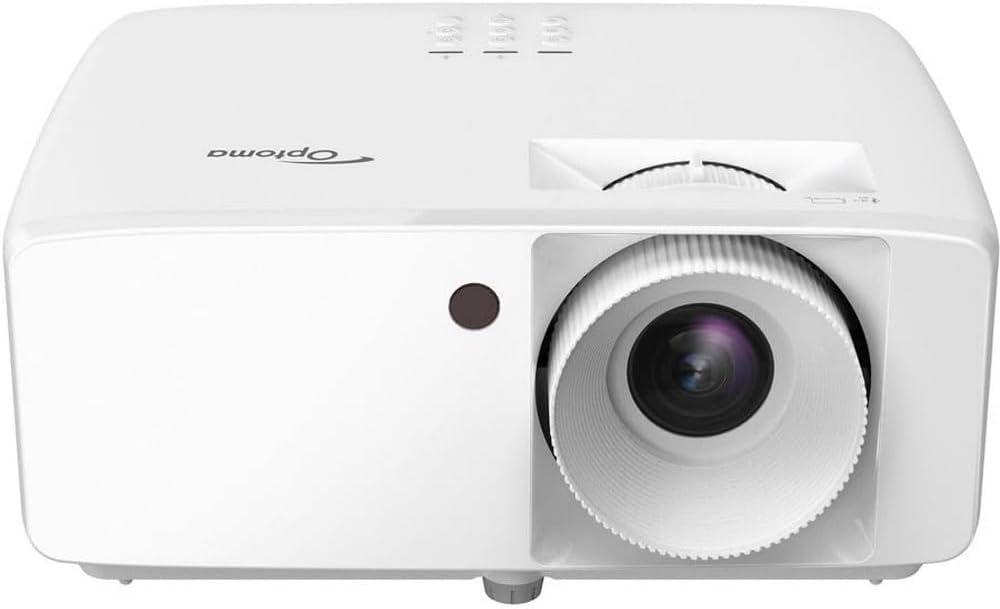
Could this projector be the right fit for your bright-room presentations, classrooms, or tight spaces where a large image matters but distance is limited?

Optoma ZH406STx Short Throw Full HD Professional Laser Projector | DuraCore Laser Technology | High Bright 4,200 Lumens | 4K HDR Input | Four Corner Image Adjustment | Network Compatible — Quick summary
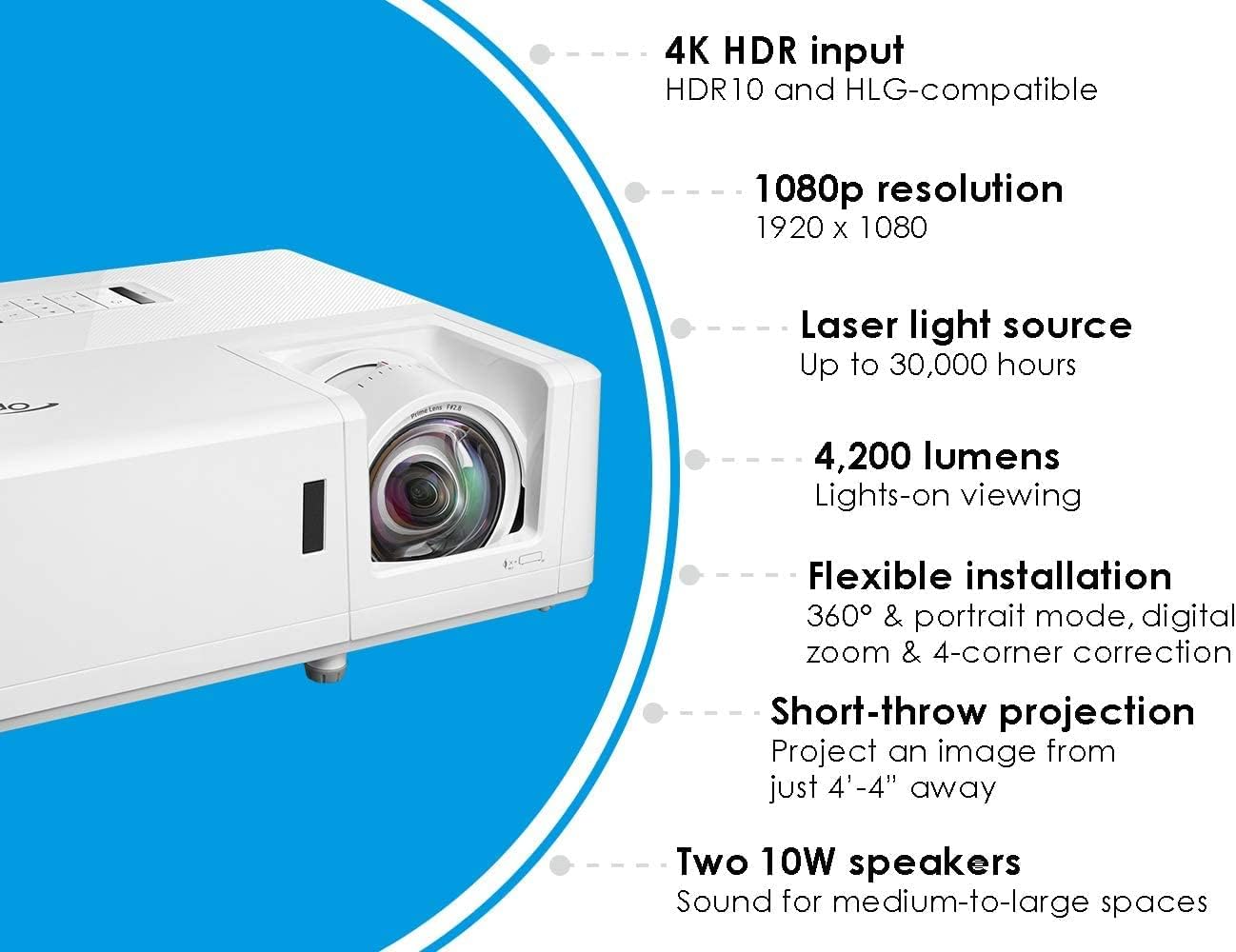
You get a short-throw, professional-grade laser projector built for bright-room use and continuous operation. The ZH406STx pairs a 1920×1080 native resolution with a powerful 4,200 lumens output and a DuraCore laser light source rated for up to 30,000 hours, so you won’t be swapping lamps or filters frequently. It accepts 4K HDR input (HDR10 & HLG) and provides flexible installation tools like 0.8–2.0x digital zoom and four-corner image correction.
Key specifications
This table breaks down the headline specs at a glance so you can quickly compare features and decide whether they match your needs.
| Feature | Specification |
|---|---|
| Native resolution | 1920 x 1080 (Full HD) |
| Brightness | 4,200 lumens |
| Contrast ratio | 300,000:1 (manufacturer-stated) |
| Light source | DuraCore laser, up to 30,000 hours |
| HDR support | 4K HDR input with HDR10 & HLG |
| Throw type | Short throw (approx. 0.5:1 throw ratio) |
| Example 120″ distance | ~4′ 4″ (1.32 m) |
| Zoom | 0.8 – 2.0x digital zoom |
| Image adjustment | Four corner correction |
| Dust/water resistance | Manufacturer-stated IPX6 (see notes) |
| Connectivity | Multiple inputs, network compatible (LAN) |
| Ideal uses | Business, education, digital signage, rooms with ambient light |


Design and build quality
The ZH406STx looks and feels like a professional installation projector. You’ll notice a robust chassis and connection layout designed for fixed installs or mobile carts. The fan and ventilation arrangement aims to manage heat without being excessively loud for presentation environments.
Because it’s a laser projector, the absence of a serviceable lamp compartment simplifies the exterior and reduces maintenance points. The build supports ceiling mount or table placement, and the short-throw lens keeps the unit compact in room layout planning.
DuraCore laser and long-term reliability
Optoma’s DuraCore laser technology is the headline when it comes to reliability. The manufacturer-stated 30,000 hours of runtime means you’re effectively buying a product with a long operational life before any light-source replacement would normally be necessary.
The product details reference an IPX6 dust resistance rating to protect the optical engine. Note that IPX6 technically describes resistance to powerful water jets rather than a dust rating (the dust protection digit is absent in IPX6). Still, the manufacturer’s messaging stresses durability against particulate ingress and environmental exposure — and you can generally expect significantly lower maintenance with a sealed laser engine compared with lamp-based projectors. If you need absolute confirmation on dust ingress protection, double-check the official specification sheet or contact Optoma support.

Brightness, contrast, and real-world usability
With 4,200 lumens, this model is aimed squarely at brighter environments: classrooms, large conference rooms, houses of worship, and many digital signage applications. You won’t have to dim the lights to keep text legible or slides readable, which is a big advantage when participants need to take notes or interact.
The quoted 300,000:1 contrast ratio is impressive on paper. That level is typically achieved via dynamic contrast processing and the laser’s ability to modulate output. In practice, it helps deliver punchy looking imagery and deeper perceived blacks compared with older high-brightness lamp projectors, but don’t expect the same native contrast as a high-end home theater projector optimized for absolute black levels in a dark room. For presentation and mixed-use scenarios, image punch and legibility are strong suits here.
Image quality and 4K HDR input
Although the ZH406STx has a native resolution of 1920 x 1080 (Full HD), it accepts 4K HDR input (HDR10 & HLG). That means you can feed it 4K HDR content from modern players or streaming devices and the projector will handle HDR metadata and tone-mapping to a 1080p native panel.
How that looks in practice:
- HDR sources can deliver brighter highlights and richer color when tone-mapped well, so you’ll notice improved highlight detail relative to standard dynamic range (SDR) sources.
- The projector will downscale 4K to 1080p, so fine detail is naturally limited by the native panel resolution.
- For business slides, photos, and video content, HDR input can still provide an improved perceived dynamic range and better whites and blacks.
If your primary focus is pixel-count-dependent home theater (native 4K detail), this won’t replace a native 4K projector. If you prioritize brightness, ease of installation, and HDR-capable tone mapping for mixed content, it’s a compelling option.
Short-throw advantages and throw ratio explained
Short throw is the defining convenience of the ZH406STx. You can place the projector much closer to the screen than standard throw models and still achieve very large images. That minimizes shadows from presenters, reduces projector footprints in front of the audience, and opens possibilities in smaller rooms.
Approximate throw ratio and calculations:
- Example given by Optoma: a 120″ diagonal image from only 4′ 4″ away.
- For a 16:9 120″ diagonal screen, the image width is roughly 104.5″ (8.71 ft). With 4.33 ft distance, the throw ratio is around 0.497:1 (distance ÷ image width = 4.33 ÷ 8.71 ≈ 0.497).
- That ~0.5:1 throw ratio places the unit comfortably in the short-throw category and explains how you can get large images in tight spaces.
Here’s a quick reference table for common screen sizes using the approximate 0.497:1 throw ratio:
| Screen diagonal (16:9) | Image width (ft) | Approx. projector distance from screen | Approx. distance (ft & in) |
|---|---|---|---|
| 80″ | 5.81 ft | 0.497 × width | 2.89 ft → ~2′ 10.6″ |
| 100″ | 7.26 ft | 0.497 × width | 3.61 ft → ~3′ 7.3″ |
| 120″ | 8.71 ft | 0.497 × width | 4.33 ft → ~4′ 4″ |
Use those as starting points — small variations in wall depth, lens offset, and digital zoom will change exact placement. If you need sub-inch accuracy for fixed mounting, measure with a test image or consult the manufacturer throw table.
Zoom, image correction, and installation flexibility
This projector uses 0.8–2.0x digital zoom and offers four-corner correction. Those are convenient tools when you can’t install the projector in the ideal position.
Things to know:
- Digital zoom is a pixel-scaling technique, not an optical zoom. It crops and scales the image, which reduces effective resolution and can soften fine detail. Use digital zoom sparingly if image sharpness is critical.
- Four-corner correction helps you square the image when you have keystone or off-axis placement and you can’t physically align the projector. It’s very useful for rental installs, museum displays, or historic rooms where mounting options are limited.
- Whenever possible, position and align the projector mechanically (mounting, sliding, or small height adjustments) before relying on corner correction. Digital corrections can introduce scaling artifacts or reduce image fidelity.

Connectivity and network compatibility
The ZH406STx lists network compatibility among its capabilities. That generally means you can expect at least one of these for remote control and monitoring:
- RJ-45 Ethernet port for network control, monitoring lamp/laser hours, and potentially firmware updates.
- Compatibility with AV control systems (Crestron, AMX, Extron) or opt-in SNMP-based monitoring, depending on firmware and optional packages.
Practical tips:
- For remote management, configure a static IP and ensure proper network firewall rules so you can monitor status and push commands (power on/off, scheduling).
- Use a high-quality HDMI cable (preferably HDMI 2.0 or better) when sending 4K HDR input to preserve HDR metadata and color depth. Even though it downscales to 1080p, preserving HDR metadata allows better internal tone-mapping.
- If you rely on streaming devices or computers, test compatibility with your typical sources before final installation to confirm color and scaling behavior.
Installation tips and best practices
Set up matters more than you’d expect with a short-throw installation. Follow these friendly tips to get the most reliable results:
- Choose an ALR (ambient light rejecting) screen if the room has significant ambient light. Paired with 4,200 lumens, ALR screens help maintain perceived contrast and punch.
- Keep the projector close to the screen to maintain the short-throw advantage and minimize ambient light interception.
- Use a ceiling mount rated for the projector weight and that allows fine tilt/pan adjustments; short-throw mounts that provide precise lateral adjustments make alignment faster.
- When possible, place the lens centered horizontally with the screen and adjust height first mechanically, then use four-corner correction for final squaring.
- Test multiple picture modes: Presentation/Bright modes for maximum legibility, and a calibrated or Cinema mode when you want better color accuracy for video content.
- Avoid excessive digital zoom; reposition the projector instead to preserve crispness.

Color, calibration, and picture tuning
You’ll get the best results with some modest calibration. If you frequently display mixed content (slides, text, photos, video), choose default modes conservatively:
- Presentation mode: Use for text-heavy slides under ambient light. It prioritizes brightness and legibility over cinematic color.
- Cinema or Standard mode: Use for video in darker rooms; reduces brightness slightly in favor of better color balance and improved perceived contrast.
- Color temperature: If you want accurate whites and skin tones, set color temperature to a calibrated standard (around 6500K) or pick the mode labeled “Standard” or “Cinema.”
- Sharpness and color saturation: Reduce over-sharpness and excessive saturation; many projectors ship with enhanced defaults that look punchy but clip fine detail or oversaturate skin tones.
If color-critical work is part of your workflow (photography, branding), invest in a handheld colorimeter or hire a professional calibrator. For most presentation environments, minor tweaks to the standard modes will give very satisfying results.
Sound, noise, and environmental considerations
The product details focus primarily on imaging specs and don’t list onboard audio. Don’t rely on it for full-room sound; pair the projector with an external PA system or powered speakers for audience-facing audio. For meeting rooms or classrooms, a small powered speaker or the room’s AV system will provide the clarity and SPL you need.
Fan noise is always a variable for business projectors that run bright. In most meeting and classroom environments, the projector’s cooling system should be unobtrusive, but if you’re expecting whisper-quiet performance in a small classroom, check the decibel rating in the full specifications or demo one in a real environment.
Maintenance, longevity, and operational costs
One of the big operational advantages here is the low ongoing maintenance profile:
- Laser lifespan: Up to 30,000 hours reduces the need for lamp swaps, cutting recurring costs dramatically.
- Filterless or reduced-filter design: Fewer service tasks for dust and particle mitigation compared with lamp projectors that require frequent filter cleaning or replacement.
- IPX6 claim: The manufacturer highlights dust resistance (though IPX6 typically references water resistance). The takeaway is that the optical engine is designed with durability in mind, but verify the precise environmental rating if you have dusty or harsh conditions.
Even with low maintenance, plan for:
- Periodic firmware updates and network security checks if you run the unit on your network.
- Cleaning vents and external surfaces annually in dusty environments.
- A warranty check to understand what’s covered and whether you need extended service for mission-critical installs.
Use cases where the ZH406STx shines
This model is well suited for several common professional scenarios:
- Business presentations: Bright output and short throw reduce presenter shadows and keep slides readable without lights-off.
- Classrooms and lecture halls: Large images from short distances let you install above or near the lectern without blocking sight lines.
- Houses of worship: Bright, impactful imagery for sermon notes and multimedia in ambient light.
- Digital signage: Laser longevity and network compatibility make it attractive for installations where you want 24/7 operation and remote control.
- Museums and exhibits: Close projection distance allows flexible placement and minimized footprint in exhibit spaces.
If your primary use is a dark-room cinematic experience with maximum native contrast and fine detail, consider a native 4K home theater projector instead. For mixed-use, bright-room, or commercial installations that need durability and easy maintenance, this Optoma is a strong candidate.
Pros and cons
A balanced list helps you see trade-offs quickly.
Pros:
- Very bright at 4,200 lumens — great for ambient light environments.
- Short throw enables large images from a small distance (~0.5:1 throw ratio).
- Long-life DuraCore laser (up to 30,000 hours) minimizes lamp replacement and downtime.
- 4K HDR input (HDR10 & HLG) for modern source compatibility.
- Four-corner correction and digital zoom help with tricky installs.
- Designed for professional installs with network compatibility.
Cons:
- Native 1080p resolution — not native 4K; downscales 4K input to 1080p.
- Digital zoom reduces effective resolution; no optical zoom means some quality trade-offs if zoomed heavily.
- IPX6 wording about dust resistance may be ambiguous; verify environmental specs for dusty locations.
- Likely no powerful onboard speakers — external audio system needed for large rooms.
Troubleshooting and common questions
Here are quick answers to issues you’re likely to encounter and how to handle them:
- Image misalignment after mounting: Re-check mechanical mounting first (position/height). Use four-corner correction sparingly to fine-tune. If you rely heavily on electronic correction, expect some softness.
- HDR content looks washed or too dark: Try switching picture modes, and ensure HDMI source is sending HDR metadata correctly. Test with another HDR source or cable. Some projectors require specific HDMI settings or color space selection on the source device.
- Projector running hot or fan noise high: Ensure vents aren’t obstructed and that the unit has proper airflow. Check ambient room temperature, and verify fan settings in the menu (if available).
- Networking control not responding: Confirm IP address, subnet, and that the projector is allowed through network firewalls. Check manual for preferred control protocols (e.g., Telnet, HTTP, SNMP).
What to buy with your Optoma ZH406STx
These accessories and extras will help you get the best performance and reliability:
- Short-throw-specific ceiling mount or adjustable mount with lateral shift.
- Ambient Light Rejecting (ALR) screen if the room has significant light.
- HDMI 2.0+ cable for reliable 4K HDR source connection.
- External speakers or a small powered PA for room audio.
- UPS (uninterruptible power supply) for installations that require clean shutdown and protection.
- A remote monitoring system or AV control platform if you plan to manage many units across a network.
Comparison notes and alternatives
If you’re shopping, compare the ZH406STx to other laser short-throw projectors in its price/performance tier. Key differentiators to check when comparing models:
- Native resolution (Full HD vs native 4K)
- Brightness (lumens)
- True throw ratio and lens options
- Whether zoom is optical vs digital
- Input options and network control capabilities
- Manufacturer service and warranty level
If brightness and reliability under heavy use are your top priorities and you don’t need native 4K resolution, the Optoma is a compelling choice. If absolute pixel density or cinephile contrast is the priority, look at native 4K home theater projectors.
Final verdict and recommendation
If you need a bright, reliable short-throw projector for classrooms, presentation spaces, houses of worship, or commercial signage, the Optoma ZH406STx offers a strong mix of features: a long-lasting DuraCore laser, high brightness, short-throw flexibility, and modern input compatibility with HDR10 and HLG. The 1920×1080 native panel remains a solid choice for text clarity and video in professional settings, and the short throw allows large images in tight rooms without projector shadows or long mounts.
You should choose the ZH406STx when:
- You prioritize bright images in lit rooms and durable, low-maintenance operation.
- You need to project large images from a short distance with minimal room intrusion.
- You want modern source compatibility (4K HDR input) while accepting a Full HD native panel.
You might look elsewhere if:
- True native 4K resolution is mandatory for your application.
- You require optical zoom for scaling without resolution loss.
Overall, this projector is designed to make installations easier and maintenance lighter while delivering bright, punchy images suitable for a wide range of professional and educational environments. If that matches what you need, it’s worth serious consideration.
Disclosure: As an Amazon Associate, I earn from qualifying purchases.