

Are you trying to decide whether the Sony ZV-1 II Vlog Camera for Content Creators and Vloggers – Black is the right tool for your videos and content?

Quick verdict
You’ll find the Sony ZV-1 II balances portability with performance for serious vloggers and creators. It gives you a compelling mix of image quality, autofocus, and audio features that help your content look and sound professional without a heavy learning curve.
Product overview
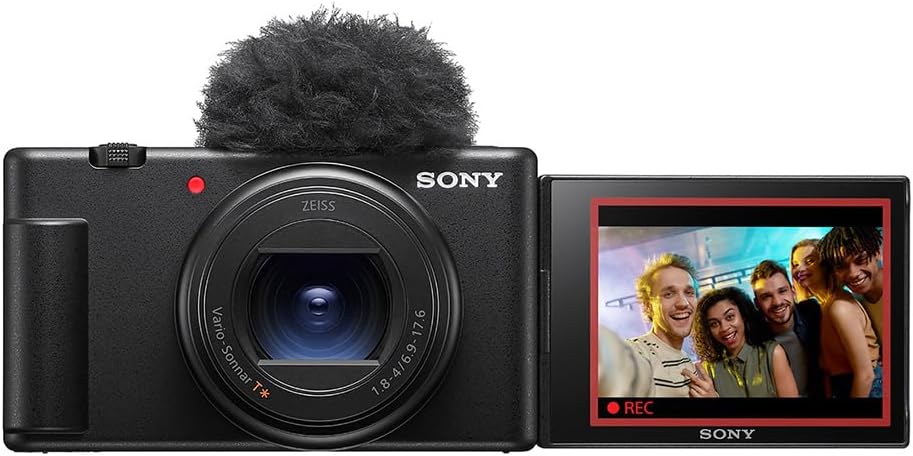
The Sony ZV-1 II Vlog Camera for Content Creators and Vloggers – Black pairs a large 1.0-type sensor with an ultra-wide 18–50mm zoom, making it easier for you to get everything in the frame while maintaining image quality. It’s designed for video-first users, with clear audio from a built-in directional 3-capsule mic, plus autofocus and Eye-AF to keep subjects crisp and in focus.

What’s in the box?
You’ll typically get the camera body, a rechargeable battery, a battery charger or charging cable depending on the retailer, and a wind screen accessory for the microphone. The included accessories mean you can start creating right away, although you might want to add a few items like extra batteries and memory cards.
Key specifications
Below is a quick breakdown of the most relevant specs so you can compare at a glance and decide whether they match your needs.
| Specification | Detail |
|---|---|
| Camera model | Sony ZV-1 II Vlog Camera for Content Creators and Vloggers – Black |
| Lens | Ultra-wide 18–50mm (35mm equivalent) zoom |
| Aperture | f/1.8–4.0 |
| Sensor | Large 1.0-type (approx. 1″) |
| Autofocus | Real-time AF tracking, Eye-AF |
| Audio | Directional 3-capsule mic + wind screen accessory |
| Video | Up to 4K (check exact frame rates and limits) |
| Special features | Vlogging-specific controls, compact body, bokeh switch, product showcase mode |
| Build | Compact, designed for handheld vlogging |

Design and build quality
The ZV-1 II feels like a device designed for your hands, balancing a compact form factor with easy-to-reach controls. You’ll notice the build is solid enough for frequent use, though it’s not weather-sealed, so you’ll want to keep it dry and protected.
Size and weight
The camera is lightweight and pocketable compared with larger mirrorless setups, making it convenient to carry all day for shoots and travel. You’ll feel the benefit when you’re walking around filming—less fatigue and more spontaneity.
Controls and ergonomics
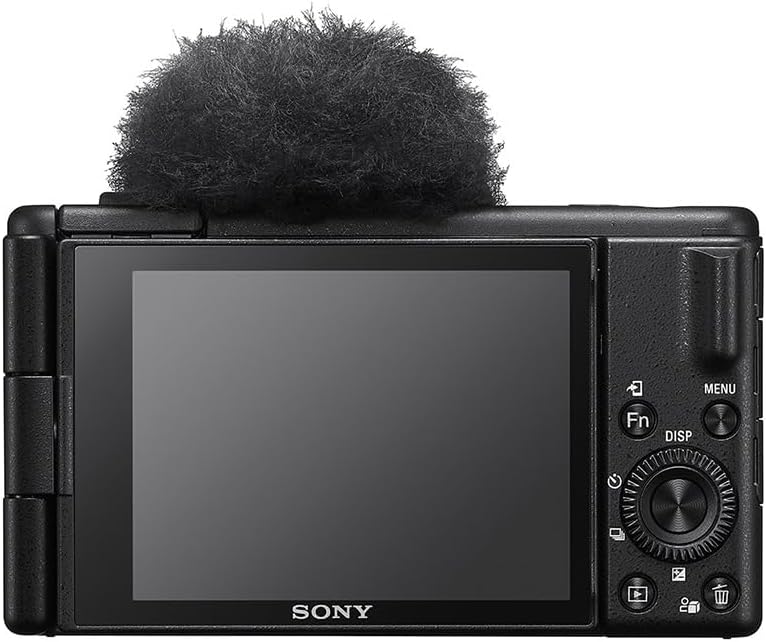
Controls are oriented toward video creators, including a record button that’s easily accessible and tactile dials that let you change key settings quickly. You’ll appreciate the flip-out screen for framing yourself, and the menu layout is intuitive if you’re used to Sony’s interface.
Lens and optics
The built-in 18–50mm equivalent zoom wins points for versatility, covering wide-angle needs for selfies and wider scenes while still offering mild tele reach for tighter framing. You’ll be able to capture interiors, landscapes, and mid-length portraits without attaching extra lenses.
Ultra-wide 18–50mm zoom
The ultra-wide end is especially useful for vlogging because you can hold the camera close and still include your environment in the shot, which helps convey context and storytelling. You’ll also find the zoom range handy when you want a tighter composition without moving the camera.
Aperture and background blur
With an aperture range of f/1.8–4.0, you’ll get a shallow depth of field at the wider end to help separate your subject from the background and create pleasing bokeh. While the maximum aperture changes across the zoom range, the optical design still produces attractive background blur for subject-focused shots.
Sensor and image quality
The large 1.0-type sensor gives you a step up from typical compact cameras and smartphone sensors, improving dynamic range and low-light capability. You’ll notice richer tonal gradation and better subject separation that make your footage and photos look more professional.
Large 1.0-type sensor benefits
A larger sensor helps you get cleaner images at higher ISOs and better control over depth of field, which is especially helpful when shooting in varied lighting conditions. You’ll also see improved highlight and shadow rendering, giving you more flexibility in post-processing.
Color science and image processing
Sony’s color processing tends to produce neutral and accurate tones, which are a good base for grading or quick exporting. You’ll likely appreciate the skin tones and color transitions—especially for talking-head videos—though you may tweak them to match your preferred style.
Autofocus and tracking
Autofocus is one of the ZV-1 II’s strong suits, built to keep you in focus while you move, speak, and demonstrate. The system uses Sony’s real-time AF tracking and Eye-AF, which makes it much easier to maintain sharp focus in dynamic situations.
Real-time AF and Eye-AF
Real-time AF and Eye-AF work for both video and stills, letting you concentrate on your performance rather than constant refocusing. You’ll particularly benefit when you’re moving toward or away from the camera or when subjects are lit unevenly.
Tracking performance in video and photo
Tracking is responsive and quick to lock onto faces and eyes, so you’ll get consistent results for most vlogging activities. You’ll still want to test tricky lighting or low-contrast scenes, but for everyday use the AF system is reliable and fast.

Video capabilities
The ZV-1 II is optimized for video creators, providing high-resolution options and filmmaker-friendly features without overly complex menus. You’ll find it suits short-form social clips as well as longer talking-head pieces for platforms like YouTube.
Resolution and frame rates
Expect full-resolution 4K recording with a decent selection of frame rates for slow motion and standard playback; check the exact frame rate and recording limits depending on firmware and settings. You’ll be able to choose options that match your workflow, whether you want cinematic 24p or smoother 60p for action.
Picture profiles and color options
The camera includes various picture profiles and creative looks to give you a head start on your color grading or to provide pleasing straight-from-camera results. You’ll find profiles tailored for skin tones and cinematic captures, and you can further refine them in post.
Audio performance
Audio is a major focus for vloggers, and the ZV-1 II’s directional 3-capsule microphone helps you record clear dialogue without immediate need for an external mic in quiet environments. You’ll get better voice capture than with many built-in mics thanks to the design and included wind screen.
Directional 3-capsule mic
The directional design emphasizes sound from in front of the camera—normally where your voice is—so you’ll hear more clarity and less ambient noise in typical scenarios. This is especially useful when you’re holding the camera and talking directly to it.
Wind screen and external mic options
The included wind screen reduces wind noise for outdoor filming, but you’ll want an external shotgun or lavalier mic for the best results in noisy or professional setups. You’ll appreciate the camera’s mic input and hot shoe, which let you use a wide range of external microphones when you need them.

Stabilization
Stabilization matters when you’re moving while filming, and the ZV-1 II includes options to keep handheld footage smoother and watchable. You’ll notice reduced shake for casual walking shots and better results in everyday vlogging scenarios.
Optical and digital stabilization
The camera offers lens-based optical stabilization supported by electronic stabilization modes, which together make a meaningful difference in handheld footage. You’ll still get the best results by using gentle movements and, when possible, a gimbal for fast or extreme motion.
How stabilization affects framing
Stabilization can crop the image slightly when electronic modes are active, so you’ll want to account for that when composing or if you plan to use wide framing. You’ll find the trade-off acceptable for most handheld situations, but check framing if you need every millimeter of the wide-angle field.
Low-light performance
Thanks to the larger sensor and relatively fast aperture, the ZV-1 II handles low-light shooting better than many compact cameras and smartphones. You’ll be able to record usable video and capture cleaner stills when lighting is limited, while still aiming for as much light as you can add.
Noise control and high ISO handling
Image noise remains controlled up to moderate ISO ranges, giving you more usable footage in dim environments without losing too much detail. You’ll still want to employ practical lighting (portable LEDs) for best results in darker scenes.
Controls, screen, and interface
Sony has tailored the controls to content creators by making recording, exposure, and focus options easy to find and use under pressure. You’ll get a flip-out screen for self-recording, with touch control for quick focus pulls and menu shortcuts.
Flip-out screen and touchscreen features
The vari-angle touchscreen flips to face you, so you’ll see framing and set levels while recording yourself. You’ll also find touch focus and menu access convenient for quick adjustments on the go.
Menus and custom settings
Menus are broad but you can customize many buttons and settings to match the way you work, which speeds up your workflow once you’ve set your preferences. You’ll want to spend a bit of time customizing the function buttons to put your most-used features at your fingertips.
Connectivity and live streaming
You’ll get modern connectivity that supports instant sharing, remote control, and even live streaming when paired with your phone or computer. This makes the camera a practical option for creators who stream on platforms like YouTube, Twitch, or social apps.
Wireless and wired options
The camera supports Wi-Fi and Bluetooth for wireless transfers and remote control, plus wired connections for direct streaming via USB or HDMI depending on your setup. You’ll appreciate being able to use it as a high-quality webcam with minimal fuss.
Smartphone integration and apps
Sony’s mobile apps help you transfer files, control the camera remotely, and even update firmware without a computer. You’ll find the phone integration handy for quick uploads and on-the-go editing workflows.
Battery life and storage
Battery life for compact vlog cameras is always a consideration, and while the ZV-1 II is efficient, heavy video use will drain batteries more quickly. You’ll likely want at least one spare battery and a fast UHS-II or UHS-I card for high-bitrate 4K recording.
Recording time and power management
Recording continuously in 4K or using screen brightness and Wi-Fi extensively will reduce runtime, so plan for additional power for long shoots. You’ll find USB charging convenient for charging on the go, but carrying spares is the safer option.
Memory card requirements
High-resolution video and high bitrates require fast and reliable memory cards, and you’ll want to use recommended UHS cards to avoid dropped frames. You’ll also appreciate having multiple cards to ensure you don’t run out of space mid-session.
Accessories and expandability
There’s a wide ecosystem of accessories that work with the ZV-1 II to expand its capabilities, from external microphones to gimbals and lights. You’ll get more flexibility when you choose accessories that match your shooting style and platform requirements.
Recommended add-ons
Consider a small shotgun mic or lavalier for cleaner voice capture in noisy situations, a pocket LED light for flattering illumination, and a compact gimbal for the smoothest motion. You’ll also want extra batteries and a case to keep everything organized and protected.
Mounting and multi-usage
The camera’s hot shoe and tripod mount make it easy to add accessories or mount on compact rigs for varied setups. You’ll find that a few well-chosen accessories drastically increase your professional output.
Comparison with similar cameras
You might be comparing the ZV-1 II to cameras like the original ZV-1, Canon G7 X Mark III, or small mirrorless systems. You’ll find each option has trade-offs between sensor size, lens flexibility, and feature sets like autofocus and audio.
ZV-1 II vs ZV-1 (original)
The II improves sensor performance and lens reach in practical ways, while holding onto the creator-friendly features that made the original popular. You’ll notice smoother autofocus and better low-light results in many scenarios.
ZV-1 II vs Canon G7 X Mark III
The Canon model has its strengths in color and ergonomics for some users, but the Sony often leads in autofocus and feature-rich video modes. You’ll want to prioritize what matters most—AF reliability or color rendering—when choosing between them.
Who should buy this camera
If you create talking-head videos, product demonstrations, or travel content, this camera fits the profile well and helps you produce polished videos quickly. You’ll benefit most if you value portability combined with excellent autofocus and integrated audio.
Ideal use cases
This is particularly strong for solo creators, vloggers, reviewers, and social media producers who need easy setup and reliable performance. You’ll enjoy how fast you can go from idea to uploaded video with minimal gear.
Pros and cons
The camera brings many creator-focused benefits but also has realistic limitations you should consider before purchasing. You’ll want to balance the positives like autofocus and audio against limits such as lack of interchangeable lenses and possible overheating in long 4K sessions.
Pros
- Excellent real-time AF and Eye-AF that keeps your subject in focus.
- Large 1.0-type sensor for better image quality and low-light performance.
- Directional 3-capsule mic with wind screen improves on-camera audio out of the box.
- Ultra-wide 18–50mm zoom is versatile for vlogging and general shooting. You’ll find these pros translate into faster production and better-looking content.
Cons
- No interchangeable lens system, limiting long-term optical flexibility.
- Battery life can be limiting during extended 4K shooting sessions without spares.
- Electronic stabilization can crop the frame when enabled, affecting composition. You’ll need to weigh these trade-offs based on your intended shooting style.
Practical tips for getting the best results
Use natural or portable LED lighting to enhance low-light performance and skin tones, even if the camera performs well in dim conditions. You’ll also want to invest in a spare battery and a good external mic if you often record in noisy environments.
Shooting recommendations
Hold the camera a little farther out at the wide end to give yourself breathing room in framing and allow the autofocus to track naturally. You’ll also save yourself headaches by routinely formatting memory cards and keeping firmware up-to-date.
Final thoughts
The Sony ZV-1 II Vlog Camera for Content Creators and Vloggers – Black strikes a convincing balance between usability and performance for creators who want professional-looking video without a complex system. You’ll come away with a tool that streamlines your production and helps you present better-looking and sounding content with minimal fuss.
FAQ
Is the Sony ZV-1 II good for live streaming?
Yes, the ZV-1 II can be used for live streaming via USB or HDMI with compatible software, giving you much better image quality than most built-in webcams. You’ll just need to confirm your streaming setup and any necessary capture software or adapters.
Can you use external microphones with the camera?
Yes, the camera supports external microphones via the hot shoe and mic input, so you can use shotgun mics or lavaliers for improved audio. You’ll likely get the cleanest results with a wired lavalier or a higher-end shotgun mic for noisy locations.
How long can you record 4K video continuously?
Continuous recording times can depend on settings, heat management, and battery, so they may vary—check Sony’s documentation for specific limits and monitor temperature warnings. You’ll want to keep spare batteries and consider breaks or external power for longer sessions.
Does it work well for solo creators who film themselves?
Absolutely—this camera is tailored for solo creators, with a flip-out screen, reliable autofocus, and integrated directional audio that all aid self-filming. You’ll find it speeds up production and reduces the need for constantly checking focus and framing.
Can you change the lens?
No, the ZV-1 II has a fixed built-in zoom lens, so lens swapping isn’t possible like on interchangeable lens cameras. You’ll want to evaluate whether the 18–50mm range and aperture meet your needs before committing.
Is the ZV-1 II weather-sealed?
No, it is not fully weather-sealed, so you should avoid exposing it to heavy rain, dust, or salt spray without protection. You’ll protect your investment with a rain cover or keeping it inside a protected bag when conditions are uncertain.
If you want, I can help you compare detailed image samples, set up a recommended accessory kit for your shooting style, or outline specific settings for YouTube, Instagram, or TikTok workflows. Tell me what videos you make most often and I’ll tailor the recommendations to your needs.

Disclosure: As an Amazon Associate, I earn from qualifying purchases.