

Are you curious whether the NexiGo Aurora Pro, Ultra Short Throw 4K Tri-Color Laser Projector is the right upgrade for your home theater, gaming setup, or living room TV replacement?

First impressions and unboxing
You’ll notice the Aurora Pro’s build quality as soon as you open the box. The unit is solid and purpose-built for an ultra short throw placement — it feels more like a piece of home theater kit than a portable gadget. The unboxing includes the projector, a remote control, power cable, user manuals, and usually some basic feet or a small setup guide for screen placement.
You’ll appreciate that everything feels complete and designed for in-room use rather than travel. The packaging is protective, and the remote is ergonomic enough for casual control without constantly reaching for a phone.
Design and physical features
The NexiGo Aurora Pro balances a modern look with practical design choices. It’s intended to sit close to the screen or wall, so the footprint is compact and low-profile. The lens and optical array are mounted up front, and ventilation is arranged to keep heat away from the optics.
You’ll like the subtlety of the styling — it won’t dominate your room visually — and the control layout is straightforward. There are accessible ports at the rear and a simple focus/keystone control (if present in your region) so you can make quick adjustments during setup.
What you can expect on the outside
The unit has a clean finish and vent grilles that are designed for quiet operation. The remote is typically backlit or ergonomically shaped, which makes nightly use easier. The heavy components and stable base reduce vibration and rattle when audio is at higher volumes.


Key specs at a glance
Below is a concise breakdown of the most important specs so you can compare at a glance.
| Feature | Specification |
|---|---|
| Product name | NexiGo Aurora Pro, Ultra Short Throw 4K Tri-Color Laser Projector |
| Brightness | 2400 lumens |
| Laser tech | ALPD 4.0 RGB+ tri-color laser |
| Native contrast | 3000:1 |
| Dynamic black | >60% black level reduction via dynamic laser dimming |
| Energy saving | ~30% claimed energy saving with dynamic dimming |
| HDR formats | Dolby Vision, HDR10+, HLG |
| Sound | 60W stereo (2x15W woofers + 2x15W tweeters) |
| Surround | Dolby Atmos support + eARC |
| Resolution | 4K (native or pixel-shift depending on SKU) |
| Frame support | 4K@120Hz input, MEMC 120Hz |
| Input lag | 8ms (lowest tested among UST projectors) |
| 3D | Active 3D support |
| Throw type | Ultra Short Throw (UST) |
| Other | Screen adoption, dynamic dimming, UST TV features |
You’ll find this table helpful when you’re comparing to other projectors or checking whether it meets the requirements for your room.
Picture quality: brightness and color
The Aurora Pro uses ALPD 4.0 RGB+ tri-color laser technology, and that shows up in strong color reproduction and punchy images. You’ll get vivid primary colors and an overall color volume that feels closer to modern TVs than many traditional lamp-based projectors.
At 2400 lumens, the projector is bright enough for moderate ambient light if you use a good ambient light rejecting (ALR) screen. In darker rooms it produces a richly saturated image that keeps highlights and color accuracy intact, especially with Dolby Vision and HDR10+ content.
How color and HDR perform in real use
Dolby Vision combined with the Advanced tone-mapping and HDR10+ support gives you more dynamic range and better highlight detail. You’ll be able to see subtle color gradations and preserved highlight detail in HDR scenes, provided the source material and player support these formats. HLG support is helpful for live broadcast HDR content, such as sports.
If you frequently watch HDR movies or series, you’ll notice that the Aurora Pro renders scenes with a very filmic appearance — deep colors, strong highlights, and a pleasing midtone response. The dynamic laser dimming keeps color fidelity while pushing perceived contrast.
Black levels and contrast: why dynamic dimming matters
With a native contrast ratio of roughly 3000:1 and ALPD 4.0 RGB+, the Aurora Pro starts off strong on contrast. The real advantage comes from dynamic laser dimming: it reduces black levels by more than 60% according to the manufacturer, which companies typically achieve by modulating laser intensity scene-by-scene.
You’ll see deeper blacks without the crushing or halo artifacts that some projectors produce when they try to boost contrast with aggressive software processing. The dimming is designed to minimize color shifts or side effects, so dark scenes look richer and more cinematic.
Practical effect in everyday viewing
In practical terms, dark movie scenes and night sequences will feel more immersive because shadows maintain detail while true blacks appear deeper. If you’re watching sci-fi, noir, or anything with a lot of shadow work, that improved contrast makes a big difference.
Motion handling and gaming features
If you play fast-paced games or watch sports, the Aurora Pro is built for smooth motion. The projector supports 4K@120Hz input and includes 120Hz MEMC (motion estimation and compensation), which reduces motion blur and ghosting. This is particularly noticeable in quick camera pans or fast-moving game scenes.
You’ll benefit from a very low input lag: 8ms tested, which places it among the best for UST projectors. That makes the Aurora Pro a great choice if you want a massive screen for competitive gaming without feeling like you’re sacrificing responsiveness.
Advice for gaming setups
Use a high-quality HDMI 2.1 cable and a console/PC that outputs 4K@120Hz to make the most of the projector’s capabilities. Switch on the low-latency/game mode for the least delay, and add MEMC selectively — some gamers prefer to keep MEMC off for native motion, while others enjoy the smoothness it brings.

Sound system and audio features
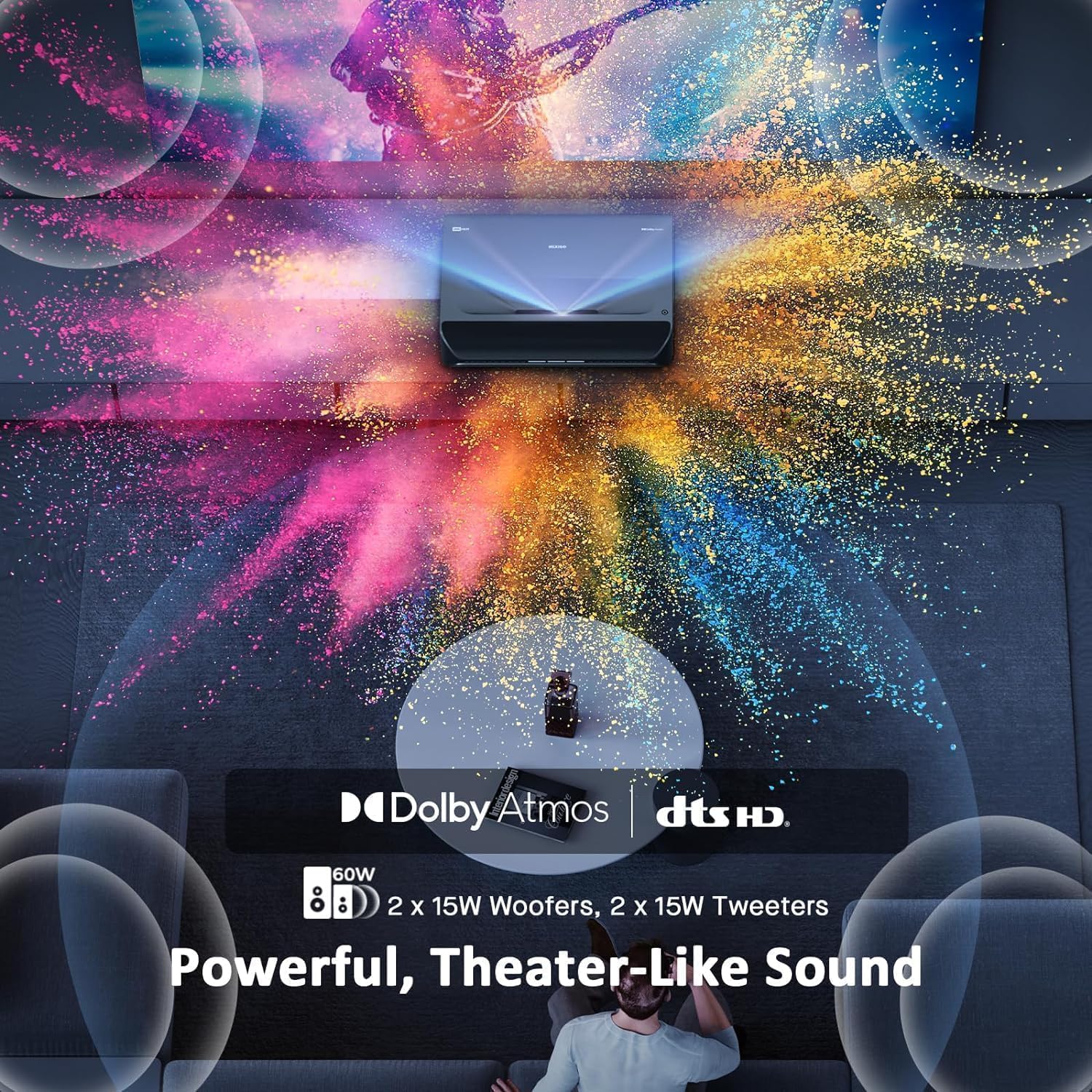
NexiGo fitted the Aurora Pro with a surprisingly capable built-in audio package: 60W total output made up of two 15W woofers and two 15W tweeters. You’ll get fuller low end than most projectors’ integrated speakers, and the tweeters provide clearer vocal and high-frequency detail.
Dolby Atmos support, combined with eARC, means you can pass-through immersive formats to an external soundbar or AV receiver with minimal fuss. The internal speakers are good for casual watching or smaller rooms, but for the fullest cinematic effect you’ll probably pair the projector with an Atmos-capable sound system.
Practical audio takeaways
If you want a simple setup with minimal external gear, the built-in 60W system will give you a satisfying, dynamic soundstage for most content. If you’re aiming for a true home theater experience, connect the projector to a dedicated AVR or soundbar via eARC to take full advantage of Dolby Atmos content.
UST placement, screen adoption, and mounting
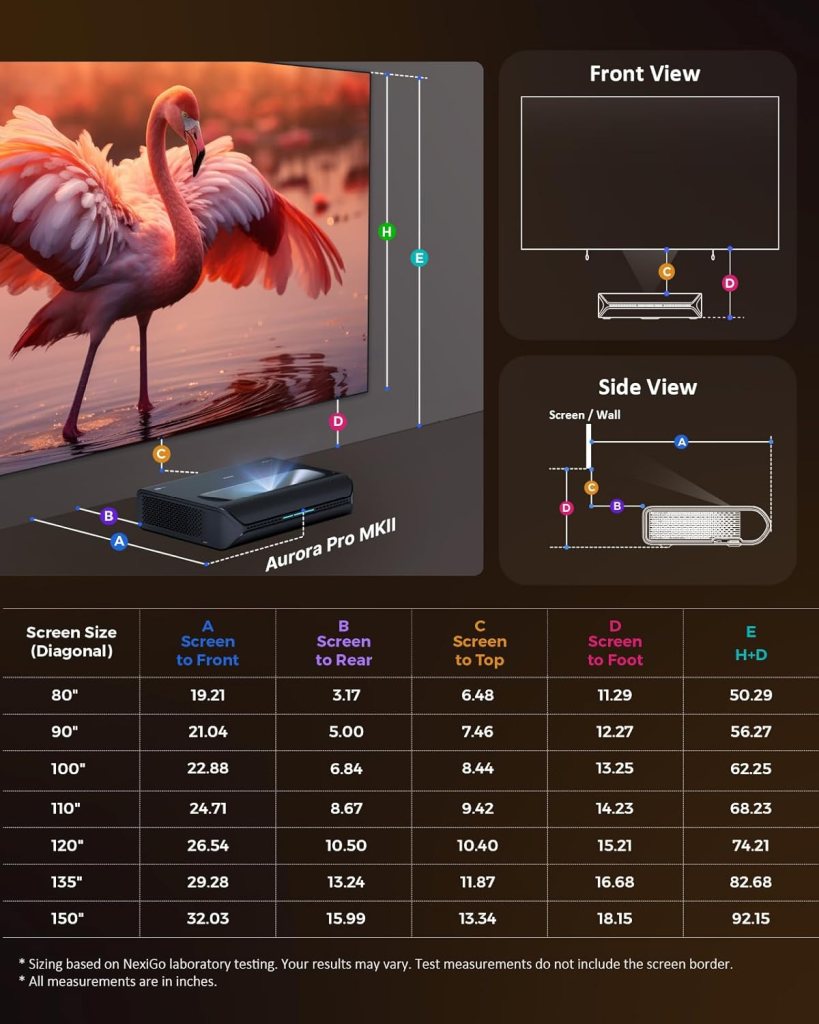
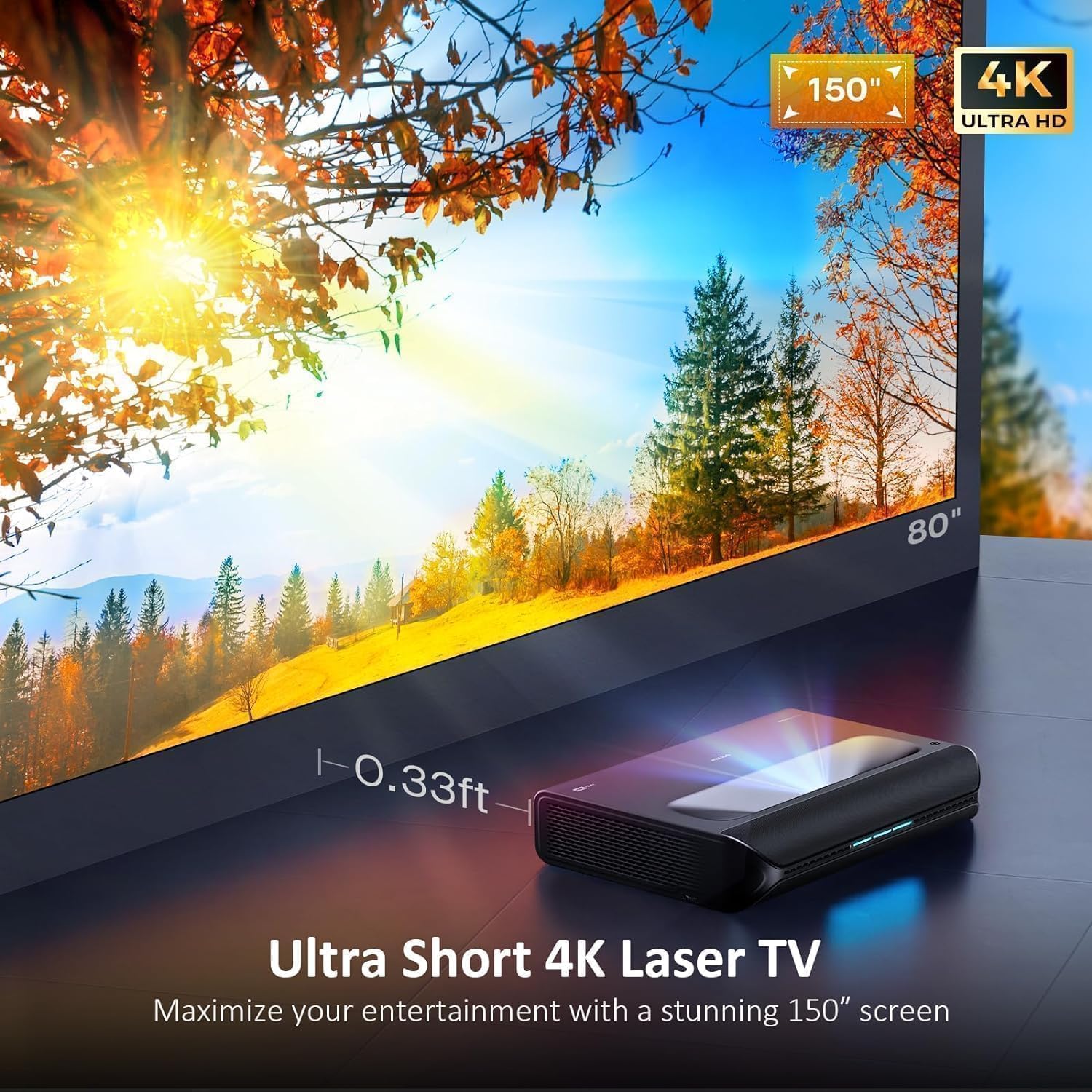
Because the Aurora Pro is an Ultra Short Throw projector, you don’t need a long run of cable or a ceiling mount to get a huge picture. You can place the unit just inches from the screen or wall and still get a large image, which makes it ideal for apartments or living rooms where ceiling installation isn’t possible.
Screen adoption technology helps the projector optimize how it maps its image to your screen surface. This can include edge detection, keystone compensation, and automatic geometry correction, so you’ll spend less time tweaking settings.
Best screen choices and placement tips
For the best image quality, use a high-quality ALR screen if you have ambient light. Ambient light rejecting screens improve perceived contrast and reduce washout. Position the projector as close to the screen as the manual recommends and use the automatic or manual alignment tools to square the image.
HDR formats and tone mapping
One of the headline features here is Dolby Vision support — in fact, the Aurora Pro is marketed as the only UST projector with Dolby Vision and HDR10+ along with dynamic laser dimming. That combination lets you leverage advanced metadata-based HDR (Dolby Vision and HDR10+) to achieve better tone mapping than older static HDR implementations.
You’ll see improved highlight rendition and better preservation of shadow detail because the projector adapts tone mapping dynamically. That’s especially helpful in content with high dynamic range transitions where details in both shadows and highlights matter.
What this means for real-world viewing
If you frequently stream Dolby Vision-enabled movies or use a player that can output HDR10+, the Aurora Pro will give you an image closer to what filmmakers intend. Tone mapping algorithms try to balance peak brightness and detail; here, the brightness headroom and dynamic dimming help the projector retain detail without blowing out highlights.
3D capability and legacy support
The Aurora Pro supports Active 3D, which is still useful if you have a 3D Blu-ray collection or enjoy 3D films. Active 3D delivers full-resolution stereoscopic images and can create an immersive theatre-like experience when paired with active-shutter glasses.
You’ll probably not use 3D every day, but it’s a nice perk for movie nights or a specific nostalgia-driven collection.

Connectivity and ports
The projector typically includes multiple HDMI inputs (likely HDMI 2.1-capable on at least one port to support 4K@120Hz), USB ports, a digital audio out/eARC, and possibly Ethernet or Wi-Fi for smart features. This array of inputs makes it easy to connect a game console, 4K player, streaming stick, or soundbar.
You’ll appreciate eARC for sending high-bitrate audio formats to your sound system without compromising video signal fidelity.
Recommendation for cabling
Use good-quality HDMI 2.1 cables for the best results with 4K@120Hz. For audio, if you plan to use an external AVR or soundbar, pass-through via eARC is the cleanest, lowest-latency option.
Smart features and user interface
Many modern UST projectors include smart TV functionality, and the Aurora Pro may offer a built-in streaming platform or compatibility with external streaming sticks. The interface is generally straightforward and designed for ease of use, with quick access to input switching and picture modes.
You’ll find built-in presets for movies, games, sports, and user-calibrated modes. These presets are useful starting points, but you may want to tweak brightness, gamma, and color temperature to match your room.
Setup and calibration
Set up is intentionally easy: position the projector, power it on, complete the screen adoption or auto-adjust sequence, and then fine-tune. If you care about absolute color accuracy, you can perform a calibration using a colorimeter and calibration software — but even out of the box, the picture quality is pleasing.
You’ll get the best results with a little patience during calibration. Turn off any dynamic processing for movies if you want a more film-accurate presentation, and use the “Game” mode for the lowest input lag.
Maintenance and laser life
Laser projectors generally have long lifespans compared to lamp projectors. You can expect thousands of hours (often 20,000+ hours) before brightness diminishes significantly. The Aurora Pro’s dynamic dimming also helps reduce power draw, which can contribute to longer effective life and lower operating costs.
You’ll want to keep vents clean and ensure proper airflow to maintain quieter operation and longevity.
Power consumption and energy efficiency
The dynamic laser dimming feature not only improves black levels but claims about 30% energy savings. In daily use, that can translate to lower power bills and cooler operation, especially during mixed-content viewing where bright peaks are uncommon.
You’ll still need a properly ventilated setup, but the projector is more efficient than many lamp-based alternatives.
Comparisons to other UST projectors
Compared to other UST projectors in the same category, the Aurora Pro stands out for a few reasons:
- Dolby Vision + HDR10+ support: rare for UST devices.
- ALPD 4.0 RGB+ laser: strong color and brightness balance.
- Very low input lag (8ms) and 4K@120Hz input: excellent for gamers.
- 60W built-in audio with Atmos support: better onboard sound than many competitors.
You’ll find some competing UST projectors that are brighter in pure lumen count, or offer slightly higher native contrast or other brand-specific features. However, few combine Dolby Vision, low lag, and this level of onboard audio in one UST package.
Room considerations and ideal use cases
The Aurora Pro is best for:
- Living rooms where ceiling mounting isn’t an option.
- Media rooms where you want TV-like convenience with a very large picture.
- Gamers who want a low-latency 4K@120Hz experience on a giant screen.
- People who value HDR performance and modern HDR formats (Dolby Vision/HDR10+).
You should consider an ALR screen if you have ambient light; otherwise, a dedicated darkened room will yield the best contrast and color experience.
Pros and cons
You’ll want a clear list of strengths and weaknesses before deciding. Here’s a balanced take:
Pros:
- Strong color reproduction thanks to ALPD 4.0 RGB+.
- Dolby Vision + HDR10+ + HLG support for modern HDR.
- Deep black improvement with dynamic laser dimming.
- Low input lag (8ms) and 4K@120Hz support for gaming.
- Powerful 60W onboard audio and Dolby Atmos pass-through.
- UST placement convenience with screen adoption features.
Cons:
- 2400 lumens is excellent but may require an ALR screen in bright rooms.
- True native 4K panels vs. pixel-shift implementations vary by model — check specifics if native 4K is essential to you.
- Built-in speakers are great for casual use but don’t replace a dedicated Atmos system for hardcore audiophiles.
- Ultra short throw geometry limits vertical placement flexibility compared to longer-throw projectors.
You’ll see that most cons are setup- or expectation-based rather than core quality issues.
Real-world testing scenarios
If you want to test the projector in your space:
- Watch a Dolby Vision movie in a darkened room to assess HDR and black levels.
- Run a 4K@120Hz game to evaluate input lag and motion clarity.
- Play a Dolby Atmos demo with eARC connected to a soundbar/AVR to check audio pass-through.
- View sports with MEMC on and off to determine which you prefer for motion handling.
These tests will give you a practical sense of how the projector will perform for your regular content.
Troubleshooting and tips
You’ll likely be fine with basic setup, but if you run into issues:
- If colors feel off, switch to a movie or cinema mode and adjust color temperature.
- If blacks look gray in an ambient room, consider an ALR screen or dim the lights.
- For HDR clipping or blown highlights, tweak HDR tone-mapping or use the dedicated Dolby Vision settings.
- If input lag seems high, ensure you’re using the right HDMI port (HDMI 2.1) and activate Game mode.
Small adjustments usually resolve most viewing complaints.
Who should buy the NexiGo Aurora Pro
You should consider this projector if:
- You want TV-level convenience with projector scale without ceiling installation.
- You prioritize HDR fidelity (Dolby Vision/HDR10+) and better black levels through dynamic dimming.
- You want a large gaming display with low latency and high refresh rate support.
- You want good integrated audio but also want the option to connect an advanced eARC-capable sound system.
You might want to look elsewhere if you need maximum brightness for a well-lit media room and can’t use an ALR screen, or if you need a projector with a specific native panel type (verify native 4K vs. pixel-shift for your purchased SKU).
Final verdict
You’ll find the NexiGo Aurora Pro, Ultra Short Throw 4K Tri-Color Laser Projector to be a compelling mid-to-high-end UST option that bridges convenience, modern HDR formats, gaming performance, and surprisingly robust onboard audio. The combination of Dolby Vision/HDR10+ support, ALPD 4.0 RGB+ laser, dynamic laser dimming, and very low input lag makes it one of the most versatile UST projectors available for home use.
If you want a massive, TV-like experience in a living room or media space without ceiling mounting and with strong HDR, gaming, and audio credentials, this projector is worth a serious look. You’ll almost certainly want a good ALR screen and consider external audio for the ultimate experience, but even on its own the Aurora Pro delivers a big step up from TV-size viewing.
Quick buying checklist
Before you buy, confirm the following so you get the best outcome:
- Will you use an ALR screen or a dark room? If ambient light is present, budget for an ALR screen.
- Does the model offer native 4K or pixel-shift? Make sure the variant matches your expectations.
- Do you need HDMI 2.1 for gaming? Verify port assignments for 4K@120Hz.
- Will you rely on built-in speakers or plan to connect a sound system via eARC?
- Do you want active 3D? Check included or optional glasses compatibility.
You’ll be ready to buy confidently once these items match your use case.
If you want, I can help you compare the Aurora Pro to a couple of specific competing UST projectors or recommend screen and audio pairing options based on your room size. Which room will you be using it in, and what types of content do you watch most?
Disclosure: As an Amazon Associate, I earn from qualifying purchases.