


Are you looking for a discreet way to monitor your home, nanny, or office without making anyone feel watched?


SHARP Alarm Clock Radio Hidden Camera Nanny Cam for Covert Home Surveillance
This article gives you a friendly, thorough guide to the SHARP Alarm Clock Radio Hidden Camera (a 1080P spy camera built into a SHARP-style alarm clock radio). You’ll learn what it does, how to set it up, how to use it responsibly, and how it compares to similar devices. Every section breaks down the details so you can decide whether this covert nanny cam fits your needs.
What this product is and why it might matter to you
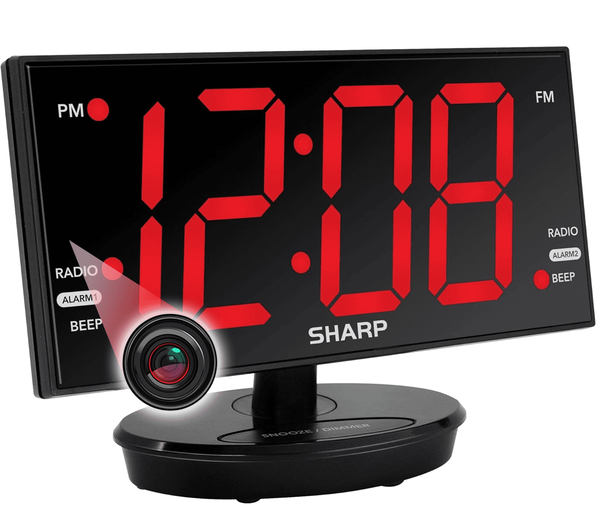
You get a fully functional alarm clock radio with an integrated covert camera that records 1080P video and audio, stores footage on 128GB internal memory, and offers Wi‑Fi remote viewing and control via a mobile app. It’s designed to blend in naturally on a nightstand, desk, or mantel while giving you reliable monitoring capability. The device’s large, swiveling clock face lets you adjust the surveillance angle without raising suspicion.
Key features at a glance
You should know the most important features before you buy. These are the elements that make the SHARP Alarm Clock Radio Hidden Camera practical for everyday covert monitoring.
- 1080P HD video recording (optimized for surveillance at 15 FPS)
- Audio recording
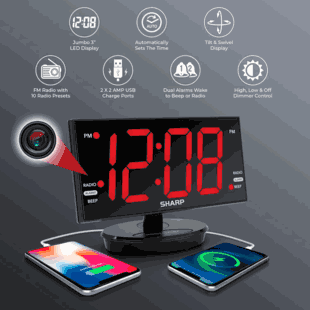
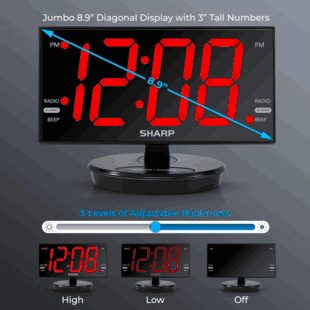
- Large 8.9-inch LED clock display (prominent and realistic)
- Swiveling clock face for manual aiming
- 128GB preinstalled internal memory (H.265 compression)
- Motion detection with push notifications
- Remote Wi‑Fi streaming and playback via mobile app
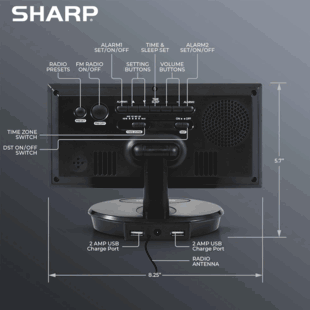
- AM/FM radio, snooze/alarm functions, USB charging ports
- Adjustable brightness (Off, Low, High)
- Ships in 1–3 days because it’s a custom-made item
Detailed specifications
Below is a quick-reference table with technical specs and what they mean for you.
| Specification | Details | What it means for you |
|---|---|---|
| Video resolution | 1080P (Full HD) | Clear footage suitable for identifying people and actions |
| Frame rate | ~15 FPS (surveillance-optimized) | Smooth enough for events, not intended for high-speed action capture |
| Compression | H.265 | Efficient storage; longer recordings on the same memory |
| Storage | 128 GB internal (preinstalled) | Weeks of footage with continuous recording; months with motion-only recording |
| Remote access | Wi‑Fi via dedicated mobile app | View live or recorded video from anywhere with internet |
| Motion detection | Yes (push notifications) | Saves power and storage; alerts you when activity occurs |
| Display | 8.9-inch LED clock face | Realistic disguise and easy time reading |
| Display brightness | 3 levels (Off, Low, High) | Reduces night glare and helps conceal camera presence |
| Radio | Integrated AM/FM | Adds normal, expected functionality for disguise |
| USB ports | 2 charging ports | Keeps bedside devices powered; increases ordinary functionality |
| Physical adjustability | Swiveling clock face | Lets you aim the camera discreetly at a desired area |
| Shipping | 1–3 days (custom made) | Quick turnaround but slight custom build time |
| Typical price | Sale price example: $299 (previously $349) | Mid-range spy camera cost for built-in design and features |
How the covert design works
The product is built to look and function exactly like a modern alarm clock radio you’d normally place on a nightstand or desk. The camera is concealed behind the clock face, which swivels so you can orient the hidden lens where you need coverage. Because adjusting a clock face is an expected action, the aiming movement remains inconspicuous.
You should appreciate how this design reduces the chance of discovery: the large, bright LED display, AM/FM radio, USB charging ports, and alarm functions make the device appear entirely ordinary.
Video quality and performance
This device records in 1080P Full HD using H.265 compression. That strikes a balance between image detail and efficient storage use. The recorded frame rate is tuned for surveillance (about 15 FPS), which is adequate for capturing typical household or office activities in clear, well-lit conditions.
You should expect good clarity for identifying faces and actions in daytime or well-lit indoor environments. Nighttime or low-light performance is limited compared to devices with dedicated infrared night vision, so placement and lighting matter.
Storage, recording modes, and data management
The built-in 128GB memory is a major convenience. It uses efficient compression that allows:
- Over one week of continuous 24/7 recording (approximate, depends on scene complexity and settings)
- 30+ days of motion-activated recording before looping (approximate)
Recording modes you can use:
- Continuous recording: Records everything until memory is full; loops oldest footage.
- Motion-activated recording: Saves storage and highlights important events; sends alerts to your phone.
- Scheduled recording: Allows you to record during particular hours (useful for overnight monitoring or specific windows).
You can review recordings remotely via the app and download MP4 files for safekeeping. Cloud service is available as an option; local 128GB storage is included by default.
Remote access and mobile app
You’ll be able to stream live video, replay recordings, and adjust settings remotely through the dedicated mobile app. Motion alerts push to your phone when activity is detected. Make sure your Wi‑Fi network is stable and secure so remote viewing is reliable.
App features you should look for:
- Live view with real-time audio
- Playback of recorded MP4 files
- Motion sensitivity settings and alert control
- Local vs cloud storage management
- Two-way audio (if supported by firmware)
How to set up the SHARP Alarm Clock Radio Hidden Camera
Setting it up is generally straightforward, but following a clear sequence will cut down troubleshooting time.
- Unbox and inspect: Confirm the alarm clock, power adapter, and user manual are present.
- Choose placement: Pick a flat surface (nightstand, side table, desk, mantel) with line of sight to the area you want to monitor. Avoid bathrooms or other private zones where laws prohibit recording.
- Power and plug-in: Connect the power adapter to the device and an outlet. Some models may need continuous power for 24/7 recording.
- Adjust clock face: Manually swivel the 8.9-inch clock face to aim the camera at the desired area. Minor adjustments look natural and won’t draw attention.
- Connect to Wi‑Fi: Follow the user manual and app prompts to join the device to your Wi‑Fi network. Use a secure network with a strong password.
- Configure the app: Register an account (if required), add the device, and adjust motion detection sensitivity, recording mode, and notification settings.
- Test recording and alerts: Trigger motion in front of the camera to verify that motion events record and push notifications arrive on your phone.
- Secure your footage: If you plan to keep critical footage, download MP4 files to a secure device or subscribe to cloud storage for redundancy.
Placement tips
- Place the clock about chest to eye height if you want good facial detail for people entering a room.
- Situate the clock facing doorways, play areas, or entry points for best coverage.
- Avoid placing in direct sunlight or behind glass where reflections can cause false motion events or image washout.
- Make sure a nearby outlet is available; the device functions as a regular clock and radio but requires continuous power for consistent recording.
Legal and ethical considerations
You’re responsible for following laws and acting ethically when using covert cameras. Laws differ by country, state, and local municipality. Below are general guidelines you should follow:
- Private spaces: Do not record individuals in bathrooms, locker rooms, or other intimate areas where privacy is expected.
- Consent: In many jurisdictions, you can record video in common areas of your home without explicit consent; however, audio recording laws vary. Several locations require two-party consent for audio recordings.
- Employees and tenants: Inform employees or tenants about surveillance when required by law. Some regions require explicit notice of audio or video monitoring in rental or workplace scenarios.
- Legal advice: If you have any doubt about the legality of specific use, consult a lawyer to interpret local laws as they apply to your situation.
Ethically, you should use covert monitoring only for legitimate safety or security reasons—childcare monitoring, property protection, or evidence collection for criminal activity—while respecting privacy and dignity.
Security and privacy best practices
A hidden camera that connects to Wi‑Fi can be a target if not secured properly. Protect your system with these actions:
- Strong passwords: Use a unique, complex password for the device and the associated app account.
- Firmware updates: Regularly update the device firmware through the app to patch vulnerabilities.
- Secure Wi‑Fi: Use WPA3 or WPA2 encryption on your home network and a strong router admin password.
- Two-factor authentication (2FA): Enable 2FA on the app account if available.
- Limit access: Only give app access to trusted people and regularly audit who can view the device.
- Use VPN for remote access: If you’re concerned about privacy, access your home network via a trusted VPN for added protection.
Practical use cases
You can use the SHARP Alarm Clock Radio Hidden Camera for several legitimate purposes. Here are common applications and how the device fits each.
- Nanny monitoring: Verify caregiver behavior and ensure children’s safety. Motion alerts notify you of unusual movement.
- Home security: Check on entryways and living areas for intruders or packages when you’re away.
- Airbnb / short-term rental oversight: Monitor common areas for damage or unauthorized guests (notify guests where local law requires).
- Elder care: Keep an eye on loved ones who require supervision without invasive equipment.
- Office monitoring: Oversee common workspaces or reception areas when permitted by policy and law.
Pros and cons
Here’s a concise comparison to help you weigh the benefits and trade-offs.
| Pros | Cons |
|---|---|
| Realistic disguise with fully functional alarm clock and radio | No dedicated night-vision (limited low-light performance) |
| Large swivel face allows adjustable aiming without suspicion | Frame rate (15 FPS) not ideal for high-speed event capture |
| 128GB internal memory reduces need for frequent downloads | Requires continuous power for always-on recording |
| Remote Wi‑Fi access and push notifications | Potential legal and privacy obligations vary by location |
| USB charging ports and standard clock functions increase naturalness | Cloud storage may be additional cost |
Troubleshooting common issues
If you run into problems, try these steps first.
- No live view in app: Check Wi‑Fi connection, confirm device is powered, and verify you followed the app pairing steps. Reboot the device and router if necessary.
- Motion alerts not received: Ensure push notifications are enabled in both the app and your phone settings. Verify motion sensitivity isn’t set too low.
- Poor image quality: Adjust camera angle to better-lit areas, avoid backlighting, and clean the clock face lens gently.
- App login problems: Reset your password, ensure the app is updated, and check for server status notices from the manufacturer.
- Storage looping earlier than expected: Review recording mode; motion-only mode extends storage longevity compared to continuous recording. Lower resolution settings if available.
Maintenance and care
Regular, simple maintenance will keep your hidden camera functioning smoothly.
- Keep the clock face clean: Wipe gently with a soft, dry cloth to avoid scratching the concealed lens.
- Check firmware: Review the app periodically for firmware updates and apply them as recommended.
- Test regularly: Trigger a test recording weekly or monthly to confirm everything is working.
- Backup important footage: Download critical video clips promptly to your local storage or secure cloud to prevent data loss.
- Avoid extreme conditions: Don’t place the device in areas with high heat, humidity, or direct sunlight for extended periods.
How this product compares to alternatives
You might be considering other covert camera formats. Here’s how the SHARP Alarm Clock Radio Hidden Camera stacks up against common alternatives.
- Compared to plug-in wall chargers with hidden cameras:
- Clock radio wins in disguise for a nightstand setting; chargers are more obvious as power devices.
- Chargers often have smaller footprints and can be placed in more locations, but fewer functional clock features.
- Compared to a digital photo frame spy cam:
- Photo frames offer a more static disguise for living areas; clock radios are more believable on bedside tables.
- Photo frames may display photos to reduce suspicion; clock radio functions are expected in bedrooms.
- Compared to dedicated visible security cameras:
- Visible cameras deter intruders by design; covert cameras are for observation without overt deterrence.
- Visible cameras typically offer better low-light performance or higher frame rates.
Buying tips and checklist
Before you buy, you should confirm these items to ensure the product meets your needs.
- Confirm the exact model features (night vision? two-way audio?) — features can vary between manufacturers.
- Verify storage capacity and cloud options if you prefer off-site backups.
- Ask about firmware and app update support to ensure the device will receive security updates.
- Check return policy and warranty; extended warranties may be available for added peace of mind.
- Consider placement and available power sources in your intended location.
- Review legal obligations in your area regarding video and audio recording.
Example setup scenarios
These short scenarios illustrate how you might use the device in real life.
- Nanny monitoring: Place the clock on a nursery dresser facing play areas. Set motion sensitivity to medium and enable push alerts so you receive a notification when movement is detected.
- Home office oversight: Put the clock on a bookshelf angled toward your desk. Use motion-activated recording to limit stored footage and review recordings after business hours.
- Airbnb monitoring: Position the device in a living-room corner with view of common space. Inform guests in your listing if required by law and restrict recording during private hours.
Frequently asked questions (FAQ)
Q: Will the clock look suspicious in my room? A: No — it’s designed to look like a normal modern alarm clock radio with a large LED display, radio, and USB ports. The swiveling face is an expected feature and helps you aim without drawing attention.
Q: Can I stream live video from outside my home? A: Yes, the device connects to Wi‑Fi and streams via a dedicated app, so you can view live footage and recordings remotely when the camera is online.
Q: What if I need longer recording time than 128GB allows? A: You can rely on motion-activated recording to extend time, regularly backup footage, or opt for cloud storage (if offered) to retain more history.
Q: Is audio recording legal? A: Laws vary by jurisdiction. Many places permit video recording in common areas but restrict audio recording without consent. Check local regulations or consult legal counsel.
Q: How easy is it to set up? A: Setup is generally straightforward: plug in, connect to Wi‑Fi using the app, aim the clock face, and test. The user manual will provide model-specific steps.
Q: Does it have night vision? A: This model emphasizes daytime and well-lit indoor monitoring; it doesn’t typically include dedicated infrared night vision. For low-light or night use, place the camera where ambient light is adequate.
Final considerations
If you want a covert monitoring solution that looks natural in a bedroom, office, or common living area, this SHARP Alarm Clock Radio Hidden Camera offers a compelling balance of disguise and capability. The combination of an 8.9-inch LED clock face, AM/FM radio, USB charging ports, and a swiveling camera lens makes it realistic and functional while giving you HD video, motion alerts, and robust storage.
Make sure you use the device responsibly: protect it with strong network security, respect privacy and legal boundaries, and keep firmware up to date. If you confirm that your use complies with local laws and you implement security best practices, this product can be a reliable tool for everyday covert monitoring and peace of mind.
If you’d like, I can help you compare specific models or draft a placement plan for the exact room you’re thinking of monitoring.