

Would the Nikon D5500 DX-format Digital SLR w/ 18-55mm VR II Kit (Black) be the right camera for your photography needs?

Quick overview of the Nikon D5500 DX-format Digital SLR w/ 18-55mm VR II Kit (Black)
You’ll find that the Nikon D5500 pairs a high-resolution 24.2 MP DX-format sensor with a flexible, vari-angle touchscreen and a compact, lightweight body. It’s designed to give you strong image quality, reasonable speed, and a friendly handling experience whether you’re shooting photos or 1080/60p video.
What you get in the box
When you buy this kit you’ll typically receive the camera body, the 18–55mm VR II kit lens, battery and charger, neck strap, and basic documentation. You’ll also get built-in Wi‑Fi functionality that works with Nikon’s smartphone utility to move images to your phone quickly for sharing.
Key specifications
This section gives you a concise specification snapshot to help you quickly compare core features and see whether the camera matches your priorities. The table below summarizes the essentials and makes it easy to reference them later while reading the deeper sections.
| Feature | Specification |
|---|---|
| Sensor | 24.2 MP DX-format CMOS (no optical low-pass filter) |
| Image Processor | EXPEED 4 (typical for the line) |
| Autofocus System | 39-point AF system |
| Continuous Shooting | Up to 5 frames per second |
| ISO Range | ISO 100–25,600 |
| LCD | High-resolution vari-angle touchscreen (smartphone-like) |
| Video | 1080/60p HD video |
| Connectivity | Built-in Wi‑Fi; compatible with smartphone apps |
| Kit Lens | AF-S DX 18–55mm VR II (optical stabilization) |
| Size & Weight | Compact and lightweight for a DSLR |


Image quality and sensor
The 24.2 MP DX sensor without an optical low-pass filter means you get extra fine detail resolution, so your images are crisp and rich in texture. Without an OLPF you may see slightly more moiré in certain fabrics or repeating patterns, but in most real-world shooting you’ll get noticeably sharper images that give you more flexibility for cropping.
You’ll also benefit from solid dynamic range and color depth for a camera in this class, which helps you recover shadow detail and retain highlight information during editing. If you like to push your RAW files in post-processing, you’ll be glad for the extra resolution and tonal latitude the sensor provides.
Color rendering and RAW performance
Nikon’s color science has a reputation for pleasing skin tones and natural color reproduction, and you’ll find that the D5500 continues that trend. JPEGs straight from the camera will look very usable for everyday shooting, but you’ll get the real benefit by shooting RAW when you want maximum control.
When you shoot RAW, you’ll be able to fine-tune white balance, recover highlights, and pull details out of shadows without too much penalty. If you’re serious about editing, RAW files from this camera respond well to adjustments in exposure, contrast, and color grading.
Autofocus and shooting speed
The 39-point AF system offers a substantial upgrade over very basic AF modules, giving you many more cross-type points for accurate focus across the frame. At up to 5 frames per second continuous shooting, the D5500 can keep up with many everyday action situations, from kids at play to casual sports and wildlife when the action isn’t too fast.
Autofocus performance is reliable in good light and remains competent in lower light, though it won’t match the high-end pro bodies in extreme low-light or high-speed continuous tracking. For most casual and enthusiast photographers you’ll find AF speed and accuracy more than adequate.
AF modes and tracking
You can use the various AF modes—single-point AF for precise focus, dynamic-area AF for moving subjects, and auto-area AF for general-purpose shooting—to match your subject and style. The camera’s tracking routines help keep subject focus as they move across the frame, and the 39-point layout gives you flexibility when composing off-center subjects.
If you’re photographing subjects that make unpredictable, rapid movements, you may need to pair AF settings with a higher shutter speed or use predictive techniques to help maintain focus. For most portraiture, street, and travel shooting, the AF system will provide speed and accuracy that feels responsive.
Screen and handling
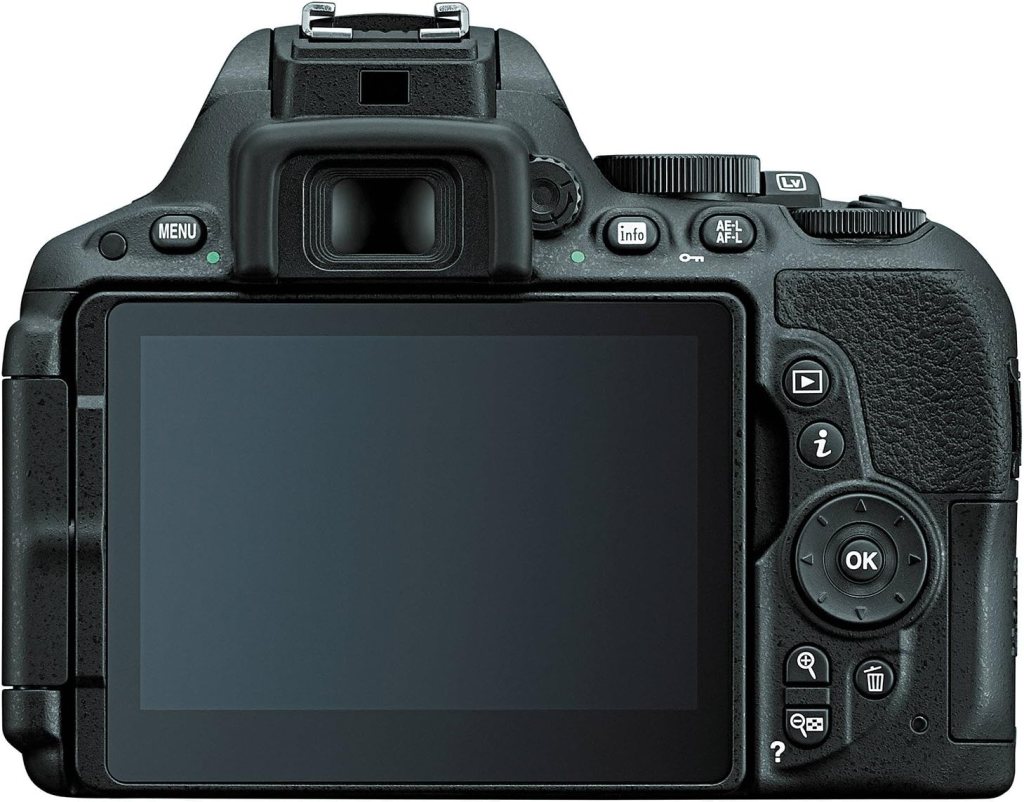
One of the D5500’s nicest ergonomic touches is the high-resolution vari-angle LCD with a smartphone-like touchscreen interface, which makes changing settings and focusing in Live View intuitive. You’ll appreciate the ability to tilt and rotate the display for low-angle or high-angle shooting, and the touchscreen means you can set focus points by touch, swipe through images, and navigate menus like you would on your phone.
The camera body is compact and light compared to many DSLRs, so it’s comfortable to carry during longer outings and won’t weigh down your gear bag. The grip is designed to give you a secure hold without feeling bulky, making the camera pleasant to use for travel, family events, and everyday photography.
Touch controls and menu
The touchscreen isn’t just a nice-to-have—it makes practical tasks faster: you can tap to focus in Live View, pinch to zoom on playback, and swipe through settings and menus in a way that’s familiar if you use smartphones. Menu navigation becomes more immediate, which is particularly helpful when you’re learning or switching settings on the fly.
Keep in mind that some physical controls remain important for rapid changes during shooting, and you’ll still use the dials and buttons for quick access to exposure compensation, shooting modes, and other frequently used functions.
Video capabilities
With 1080/60p video capability, you can capture smooth, high-quality footage that’s suitable for action shots and can be slowed down in post for slow-motion effects. The camera includes continuous autofocus during video using Live View, though manual focus will often give you the most control when you’re aiming for a cinematic result.
Importantly for vloggers and creators, the camera includes an external microphone input so you can use a better microphone than the built-in mics, significantly improving audio quality for interviews, voiceovers, or any narrative content.
Video tips and settings
If you want smooth motion, 60p is great for more fluid playback, while 24p gives a more cinematic motion cadence. For better image quality, consider recording at a flat picture profile if your camera offers it, and switch to manual exposure when lighting is constant to avoid exposure shifts mid-shot. Use an external mic to reduce wind noise and capture clearer dialogue, and stabilize your shots with a tripod, gimbal, or lens with VR.
Connectivity and sharing
The built-in Wi‑Fi gives you the convenience of transferring images to your smartphone or tablet for quick sharing, and you can also use remote shooting features through Nikon’s mobile utility. That instant sharing capability makes the D5500 practical for social media updates, travel snapshots, and capturing memories that you want available right away on your phone.
Be aware that camera-to-phone connections sometimes require app updates and patience during pairing, but once set up they smooth your workflow and let you control the camera remotely for group shots or tricky angles.
How to transfer and control remotely
You can transfer JPEGs rapidly to your phone and, depending on the app’s support, control basic camera functions remotely so you can trigger the shutter without being behind the camera. This is handy for self-portraits, group photos, or creative long-exposure shots where you want zero camera shake.
If you plan to rely on remote features a lot, test the connection in different environments to learn any quirks, and keep the camera and app firmware up to date for the best compatibility.
Kit lens: 18–55mm VR II
The included AF‑S DX 18–55mm VR II kit lens is a practical, lightweight zoom that covers wide-angle to short-telephoto focal lengths—making it a useful everyday lens for travel, street photography, and family shots. The VR (Vibration Reduction) helps reduce blur at slower shutter speeds and increases the handholdable range of the lens, especially in low-light situations.
You’ll find the lens performs well for general use: it’s sharp in the center, especially when stopped down a little, and autofocus is quiet and reasonably fast. Build quality is mostly plastic to keep weight down, but that means you should handle it with moderate care and expect solid performance rather than professional ruggedness.
When to upgrade your lens
If you start shooting in low light frequently, doing portraits where you want very smooth background blur, or wildlife where reach matters, you’ll likely want to add brighter primes (like a 35mm f/1.8 DX) or a telezoom to your kit. A fast prime will give you better low-light capability and creamier bokeh, while a longer zoom will make distant subjects easier to capture.
The 18–55mm is a fine starter lens, but as your eye and needs evolve you’ll appreciate the creative difference higher-quality glass can bring.

Battery life and storage
You’ll use standard SD cards for storage, and the camera supports commonly available sizes and speeds—so you can choose larger or faster cards depending on whether you shoot lots of RAW or 1080/60p video. Because video and Live View can drain batteries faster than shooting stills, it’s wise to carry at least one spare battery if you plan to shoot heavily.
Manage power by limiting Live View usage, turning Wi‑Fi off when you don’t need it, and using power-saving modes to extend battery life during long outings or trips where charging opportunities are limited.
Ergonomics and build quality
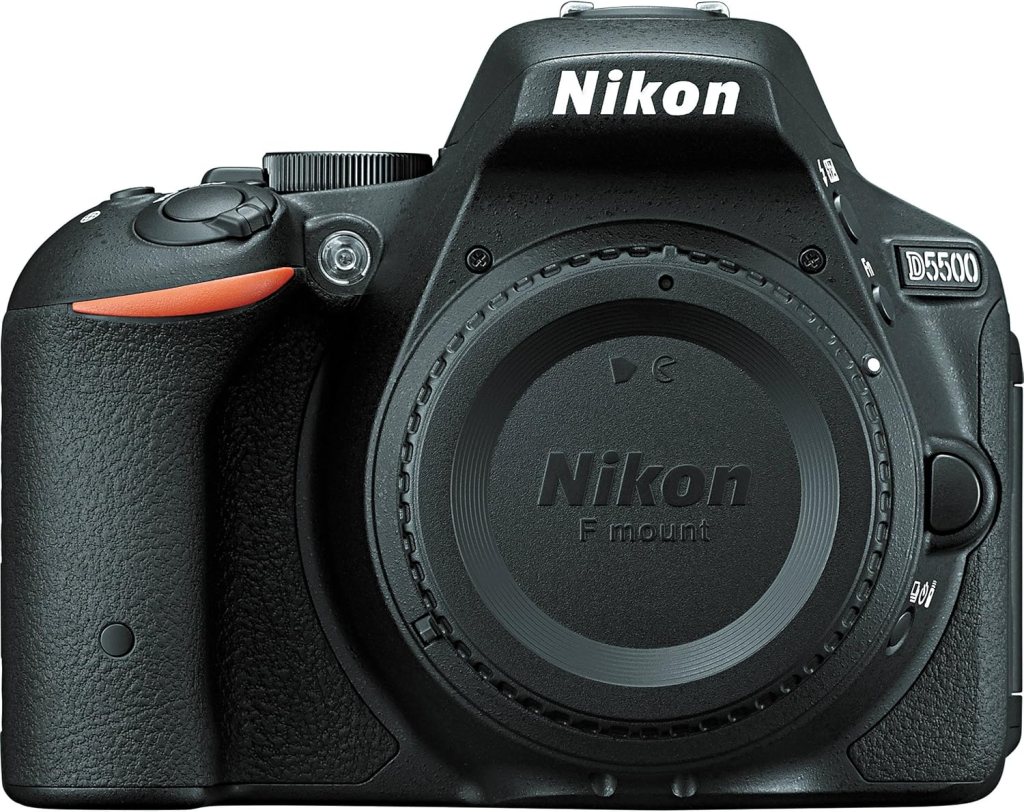
The D5500 is one of the more compact DSLRs and is pleasantly small for carrying around, which makes it a good camera to have with you all day. The body is thoughtfully designed to fit a variety of hand sizes with a comfortable grip and intuitive control layout, so you’ll feel in command even if you’re new to DSLRs.
While the construction leans toward lighter materials rather than professional-grade weather sealing, the camera still feels solid for everyday use. If you shoot in harsh weather or dusty environments often, plan for protective measures like a rain cover and careful lens changes.

Pros and cons
This quick pros and cons list helps you weigh the camera’s strengths and compromises at a glance, and think about what matters most for your shooting style.
Pros:
- High-resolution 24.2 MP sensor yields excellent detail and cropping flexibility.
- No optical low-pass filter for sharper images.
- 39-point AF system and 5 fps continuous shooting offer solid performance for enthusiasts.
- Vari-angle, high-resolution touchscreen makes composition and menu navigation very user-friendly.
- 1080/60p video and a microphone input suit casual video creation.
- Built-in Wi‑Fi enables quick image transfers to mobile devices.
Cons:
- No 4K video—limited to 1080p.
- Kit lens is functional but not exceptional in low light or for specialized shooting.
- Build lacks professional weather sealing.
- Autofocus, while good, won’t match high-end pro bodies for tracking very fast subjects.
Who this camera is for
If you’re an enthusiast who wants a high-resolution sensor, a friendly touchscreen interface, and a compact DSLR that won’t weigh you down, this camera will suit you well. It’s especially good for travelers, parents, hobbyists, and content creators who want a step up from point-and-shoot or smartphone photography without jumping to a professional, heavier body.
You’ll get the most from this camera if you shoot portraits, landscapes, street, and everyday life, and you appreciate the balance of image quality and portability.
How it compares to alternatives
Compared to entry-level DSLRs, the D5500’s sensor and touchscreen provide a notable step up in image quality and usability. Against more advanced DSLRs or newer mirrorless bodies, the D5500 still holds its own for image quality, but you may miss features like in-body stabilization, more advanced autofocus tracking, or 4K video if those are priorities.
If you’re comparing to newer Nikon DSLRs like the D5600, you’ll find many similarities; the D5600 adds Bluetooth-based connectivity in some cases, but the core imaging package is comparable. Mirrorless alternatives will often be lighter and include more advanced AF in some models, but they also sometimes come with a different lens ecosystem and cost structure to consider.
Practical shooting tips
Here are practical tips to help you get the best results from your D5500 in real shooting situations:
- Landscapes: Use low ISO (100–200) and a mid-range aperture (f/8–f/11) for sharpness across the frame. Use a tripod and the self-timer or remote to avoid shake.
- Portraits: Use the kit lens at the long end and shoot around f/4–f/5.6 for a pleasing background separation, or use a 35mm or 50mm prime at f/1.8 for creamier bokeh and better low-light performance.
- Low light: Increase ISO cautiously. The sensor handles up to mid-range ISOs well; stop down to maintain sharpness, and consider a faster prime lens to reduce reliance on high ISO.
- Action: Use shutter priority or manual exposure with shutter speeds of 1/500s or faster for most sports, and 1/1000s for very fast motion. Use AF-C with dynamic-area AF for moving subjects.
- Video: Use manual exposure to avoid unexpected changes in brightness, and an external mic to improve sound quality. Stabilize your camera with a gimbal or tripod for professional-looking footage.
Accessories to consider
To expand your camera’s potential, think about these accessories that will cover common needs:
- Extra battery: For long days shooting or travel.
- High-quality SD card: Fast cards for continuous shooting and long video clips.
- Tripod: For landscapes, low light, and video stability.
- External microphone: To drastically improve audio quality for videos.
- Prime lens (35mm or 50mm f/1.8): For low-light performance and better background separation.
- Camera bag: To protect and organize your gear.
- UV/ND/PL filters: For lens protection, managing bright light, and controlling reflections.
Troubleshooting common issues
If you run into hiccups, these straightforward troubleshooting steps will help you keep shooting:
- AF hunting in low light: Use a faster lens or enable AF assist lamp if available; switch to single-point AF for better precision.
- Wi‑Fi pairing trouble: Make sure your mobile app and camera firmware are updated, and follow the pairing steps carefully; sometimes deleting old paired devices helps.
- Touchscreen unresponsive: Check menu settings to ensure touch controls are enabled and restart the camera; low temperatures may affect responsiveness.
- Battery draining quickly: Disable Wi‑Fi when not needed and avoid prolonged Live View; carry a spare battery for long sessions.
- Video overheating or cutoff: Give the camera cool-down periods between long takes, and monitor recording time if ambient temperatures are high.
Real-world workflow suggestions
When you’re shooting events or travel with this camera, organize a workflow that helps you stay efficient and ensure backups:
- Shoot RAW + JPEG if you want quick JPEGs for sharing and RAW for editing later.
- Label folders on your SD card by day or event to simplify archiving.
- Transfer high-priority images to your phone for immediate social sharing, then move full-resolution files to your laptop or backup drive each day.
- Use a cloud backup service for critical trips to ensure your images are safe even if a card is lost or damaged.
Long-term value and upgrade path
The Nikon D5500 gives you a strong foundation with image quality that will remain useful as your skills grow. As your needs change, you can expand by adding primes, faster zooms, or external accessories like a better microphone and tripod. If you later want more advanced AF or 4K video, a higher-tier DSLR or mirrorless body would be the logical next step, building on your existing lens investments (if you stay within Nikon’s ecosystem).
Upgrading lenses often gives you more creative benefit than moving bodies early on, so investing in a good prime or two can be a smart long-term move.
Final thoughts
If you want a friendly-to-use DSLR with a high-resolution sensor, great handling from the vari-angle touchscreen, and solid all-around performance for both stills and 1080/60p video, the Nikon D5500 DX-format Digital SLR w/ 18-55mm VR II Kit (Black) is a very capable choice. It gives you a balance of portability, image quality, and features that suits hobbyists, travelers, and content creators who prefer a traditional DSLR experience with modern conveniences.
If you value compactness, image quality, intuitive touchscreen controls, and the flexibility to grow your lens collection, the D5500 will serve you well and continue to produce excellent images as you refine your photography.

Disclosure: As an Amazon Associate, I earn from qualifying purchases.